 Small batches, high standards. Our rapid prototyping service makes validation faster and easier —
  EN
EN


From CAD File To Doorstep: How CNC Machine Online Services Actually Work
 What CNC Machining Online Actually Means
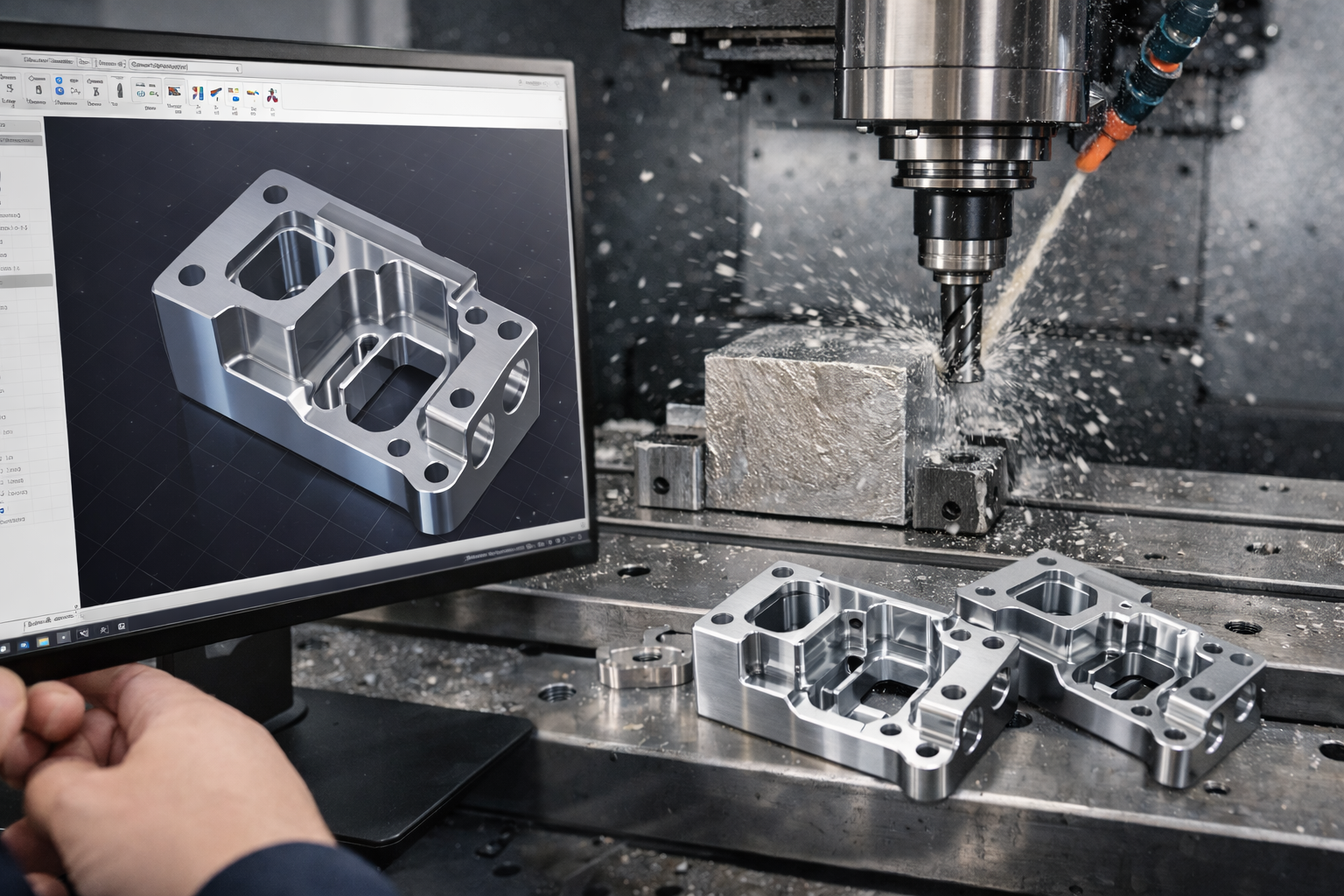
Imagine uploading a digital design file and receiving a precision-machined metal part at your doorstep within days. That's the promise of CNC machine online services—and understanding how they work starts with grasping the fundamentals of this transformative technology.
From Digital Design to Physical Part
CNC stands for Computer Numerical Control. At its core, CNC machining is a subtractive manufacturing process where pre-programmed computer software controls the movement of cutting tools to shape raw materials into finished parts. Unlike 3D printing, which builds objects layer by layer, CNC cutting removes material from a solid block—called a blank or workpiece—to reveal the final geometry hidden within.
The process begins with a CAD (Computer-Aided Design) file. This digital blueprint gets converted into G-code, a specialized language that tells the machine exactly where to move, how fast to spin, and how deep to cut. The result? Parts with extreme precision and mechanical properties that meet demanding industrial standards.
How Computer Control Revolutionized Manufacturing
Before computer numerical control, machinists manually operated lathes, mills, and grinders. Every cut required human judgment and hands-on adjustment. While skilled craftsmen could produce excellent work, the process was slow, inconsistent, and difficult to scale.
Computer control changed everything. Modern machining centers execute complex operations automatically, producing parts with very tight tolerances—often within thousandths of an inch. This automation reduces human error, speeds production, and enables the creation of geometries that would be nearly impossible to achieve by hand.
The Basics of Subtractive Manufacturing
So what does an online CNC machine service actually provide? These platforms combine precision cnc machining capabilities with digital workflows that streamline the entire ordering process. Instead of calling machine shops, negotiating quotes, and waiting days for estimates, you simply upload your design file to a website.
Within minutes—sometimes seconds—sophisticated algorithms analyze your part geometry, material requirements, and complexity to generate an instant quote. This represents a dramatic departure from traditional cnc fabrication workflows where quotes required manual engineering review.
Online CNC platforms democratize access to precision manufacturing by eliminating the barriers that once made custom machining accessible only to large companies with established supplier relationships.
Traditional machine shops require personal communication, relationship building, and often minimum order quantities. Online cnc machining services open the door for startups, independent designers, and small businesses to access the same manufacturing capabilities previously reserved for major corporations. You can order a single prototype or scale to hundreds of production parts—all through the same digital interface.
The key difference comes down to accessibility and speed. With traditional CNC services, you work directly with a factory team, discussing specifications and building relationships over time. With online platforms, you trade some of that personal interaction for convenience, instant pricing transparency, and access to a broader network of certified manufacturing partners. Both approaches have their place, but understanding this distinction helps you choose the right path for your specific project needs.
CNC Machine Types and When to Use Each
Now that you understand what CNC machining online means, the next question becomes: which type of machine will actually make your part? This isn't just technical trivia—choosing the right machine type directly affects your part's cost, lead time, and achievable precision. Let's break down the options so you can make informed decisions when placing your next order.
Milling Versus Turning Explained
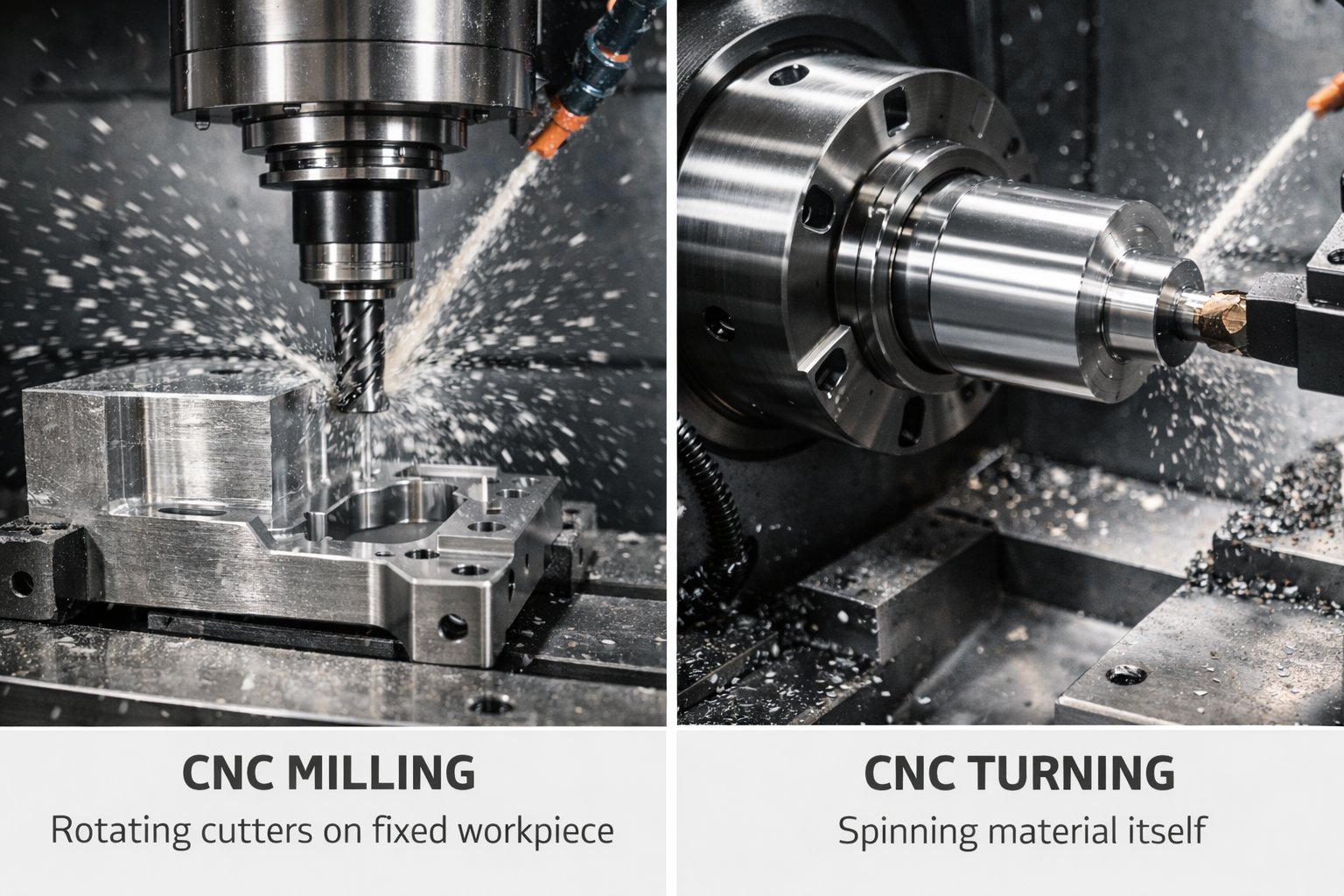
The fundamental difference between CNC milling and CNC turning comes down to one simple question: what's spinning?
In CNC turning, your workpiece rotates at high speed while a stationary single-point cutting tool shapes the material. Picture a piece of round bar stock spinning in a lathe chuck while a cutter moves along its surface, carving away material to create shafts, pins, bushings, or any component with rotational symmetry. This process excels at producing cnc turning parts with excellent concentricity and dimensional accuracy.
In CNC milling, the relationship reverses. Your workpiece stays fixed (or moves slowly) while a rotating multi-point cutting tool removes material. The cutter—whether an end mill, face mill, or ball nose tool—spins and travels across the part to create flat surfaces, pockets, slots, and complex 3D contours. CNC machining milling is your go-to for prismatic parts like housings, brackets, and molds.
Why does this matter for your online order? When you upload a CAD file, the platform's quoting algorithm analyzes your geometry to determine whether milling, turning, or a combination makes the most sense. A cylindrical shaft with threads? That's a turning job. A rectangular enclosure with internal pockets? Milling territory. Understanding this distinction helps you design parts that are easier—and cheaper—to manufacture.
Understanding Multi-Axis Capabilities
Sounds complex? It doesn't have to be. Think of "axes" as directions a machine can move. More axes mean more flexibility to approach your part from different angles.
3-Axis Milling represents the foundation. The cutting tool moves along X (left-right), Y (front-back), and Z (up-down) directions. This configuration handles planar milled profiles, drilling, and threaded holes aligned with the tool axis. For many parts, 3-axis cnc milled components deliver excellent results at the lowest cost. However, if your design includes undercuts or features on angled surfaces, you'll need multiple setups—or a more capable machine.
4-Axis Milling adds a rotary axis (typically called the A-axis) that rotates around the X-axis. This single addition unlocks significant capabilities. Your part can rotate during machining, allowing the cutter to reach features on multiple sides without manual repositioning. Complex profiles like cam lobes, helixes, and angled holes become possible in a single setup. For medium-complexity parts, 4-axis machines hit a sweet spot between capability and cost.
5 axis CNC machining services represent the pinnacle of milling flexibility. By adding a second rotary axis, these machines can orient the cutting tool at virtually any angle relative to your workpiece. This capability proves essential for aerospace components, turbine blades, medical implants, and organic 3D surfaces where continuous tool orientation changes are required. According to CNC Cookbook, 5-axis configurations can vary—with rotation occurring in any two of the A, B, or C axes—depending on whether the workpiece or spindle provides the movement.
Swiss machining deserves special mention for small, intricate turned parts. Swiss-type CNC lathes support the workpiece close to the cutting tool with a guide bushing, enabling extreme accuracy on slender components. Many Swiss machines integrate live tooling for milling features, making them ideal when both turning and milling actions are required in one setup. If you need a cnc turning service for tiny, high-precision parts like medical device components or electronic connectors, Swiss machining often provides the answer.
Matching Machine Type to Part Geometry
When you're ordering parts through a CNC machine online platform, matching your design to the right machine type saves money and avoids manufacturing headaches. Here's how to think through the decision:
- Primarily round or cylindrical? CNC turning is typically faster and more economical. Bar stock loads efficiently, and the continuous rotation produces excellent surface finishes on external diameters, bores, and threads.
- Flat surfaces, pockets, or prismatic shapes? CNC milling handles these geometries naturally. The rotating cutter can machine horizontal planes, vertical walls, and angled features across multiple faces.
- Features on multiple sides or at angles? Consider 4-axis or 5-axis milling to reduce setups and maintain tighter tolerances between features on different faces.
- Combination of rotational and prismatic features? Mill-turn hybrid machines can handle shafts with milled flats, drilled cross-holes, or keyways in a single setup.
The table below summarizes your options:
| Machine Type | Best Applications | Complexity Level | Typical Tolerances |
|---|---|---|---|
| 3-Axis Milling | Flat surfaces, pockets, slots, simple holes | Low to Medium | ±0.005" (±0.127mm) standard |
| 4-Axis Milling | Angled features, helixes, multi-side access | Medium | ±0.003" to ±0.005" (±0.076mm to ±0.127mm) |
| 5-Axis Milling | Complex contours, undercuts, aerospace parts | High | ±0.001" to ±0.002" (±0.025mm to ±0.05mm) |
| CNC Turning | Shafts, pins, bushings, threaded components | Low to Medium | ±0.002" (±0.05mm) standard; ±0.001" precision |
| Swiss Turning | Small diameter, high-precision parts | Medium to High | ±0.0005" (±0.0127mm) achievable |
| Mill-Turn | Rotational parts with milled features | Medium to High | ±0.002" (±0.05mm) typical |
Keep in mind that tighter tolerances and more complex machine configurations generally increase cost. A 3-axis machine costs less per hour to operate than a 5-axis center, and simpler setups mean faster turnaround. The smartest approach? Design your parts to the minimum complexity required for their function. If a 3-axis machine can produce your part, don't specify features that demand 5-axis capabilities unless they're truly necessary.
With a solid grasp of machine types and their strengths, you're ready to tackle the next critical decision: selecting the right material for your CNC project.
Material Selection Guide for CNC Projects
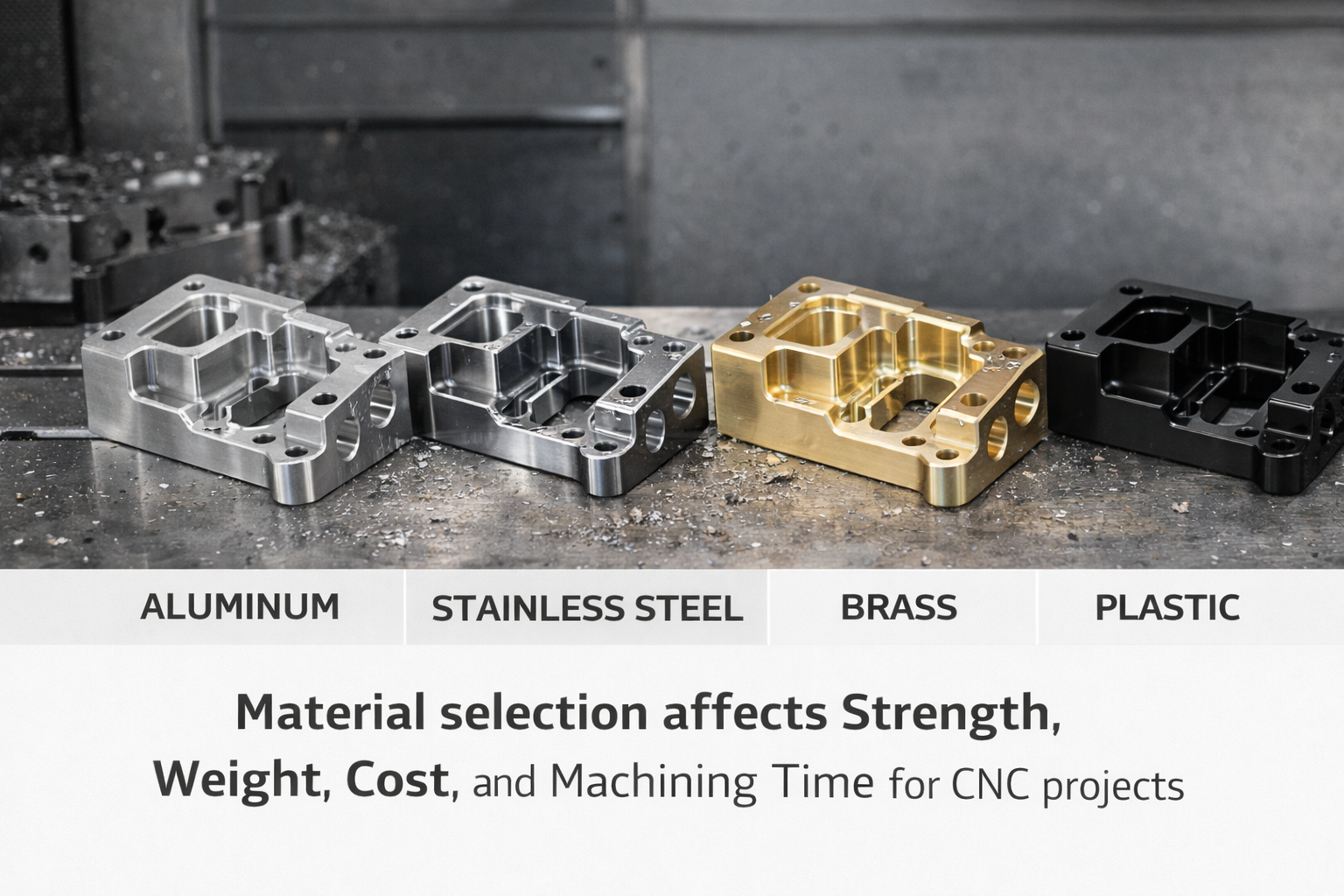
You've chosen your machine type. Now comes an equally important decision: what material should your part be made from? This choice affects everything—strength, weight, corrosion resistance, machining time, and ultimately, your final cost. Unlike competitors who simply list available options, let's dig into the trade-offs that actually matter when you're placing an order through a CNC machine online platform.
Metals for Strength and Durability
When mechanical performance tops your priority list, metals deliver. But "metal" isn't a single category—it's a spectrum of alloys with vastly different properties, machinability characteristics, and price points.
Aluminum remains the workhorse of CNC machining for good reason. According to CNC Cookbook, aluminum offers an exceptional strength-to-weight ratio combined with natural corrosion resistance and relatively easy machining. The most common alloys you'll encounter include:
- 6061: The general-purpose choice with good mechanical properties, weldability, and corrosion resistance. Excellent for brackets, housings, and structural components.
- 7075: Significantly stronger than 6061 (approaching steel strength) but more expensive and slightly harder to machine. Ideal for aerospace and high-stress applications.
- Cast Aluminum (MIC6, 356): Offers good vibration dampening and is often used for tooling plates and fixtures.
Aluminum machines quickly, which keeps costs down. Tools last longer, cutting speeds run higher, and chips clear efficiently. If your application doesn't specifically require steel's strength or other specialized properties, aluminum often provides the best value.
Steel covers an enormous range of alloys, but for CNC projects, you'll typically choose from these categories:
- Mild Steel (1018, 1020, A36): Low carbon content makes these steels easy to machine and weld. They're economical for parts that don't require high strength or surface hardness.
- Medium Carbon Steel (1045, 4140): Higher carbon content delivers better strength and wear resistance. 4140 (often called "chromoly") adds chromium and molybdenum for improved mechanical properties—common in shafts, gears, and structural applications.
- Tool Steel (A2, D2, O1): Formulated for extreme hardness and wear resistance. These steels are more challenging to machine but essential for dies, punches, and cutting tools.
Steel takes longer to machine than aluminum, which translates directly to higher costs. Tooling wears faster, cutting speeds must be reduced, and more coolant is typically required.
Stainless Steel adds corrosion resistance to the mix, making it essential for medical, food processing, and marine applications. However, stainless steel machining presents unique challenges:
- 303 Stainless: The most machinable grade, thanks to added sulfur. Choose this when corrosion resistance matters but extreme strength doesn't.
- 304 Stainless: Better corrosion resistance than 303 but harder to machine. The "304 she's a whore, 303 that's for me" mnemonic machinists use captures the preference for easier cutting.
- 316 Stainless: Superior corrosion resistance (especially against chlorides) but even more difficult to work. Common in marine and chemical processing equipment.
Expect stainless steel parts to cost significantly more than comparable aluminum components—often 2-3 times higher—due to increased machining time and tool wear.
Brass and Bronze offer distinct advantages for specific applications. Bronze CNC machining is particularly valued for components requiring excellent wear resistance and low friction. CNC bronze parts excel in bearings, bushings, and sliding surfaces where self-lubricating properties matter.
- Brass: Excellent machinability, decorative gold-like appearance, and spark resistance. Common in plumbing fittings, electrical components, and musical instruments.
- Bronze: Machining bronze produces parts with superior wear characteristics and fatigue strength. Phosphor bronze is especially popular for springs and electrical connectors, while cnc machining bronze alloys like 90-10 bronze serve marine applications due to excellent seawater corrosion resistance.
Both materials cut cleanly and produce excellent surface finishes, often reducing secondary operations.
Engineering Plastics for Lightweight Applications
When you need reduced weight, electrical insulation, chemical resistance, or simply lower costs, engineering plastics offer compelling alternatives to metals. However, not all plastics behave the same during machining or in service.
Delrin (Acetal/POM) stands out as one of the most machinist-friendly plastics available. Delrin plastic offers exceptional dimensional stability, low friction, and excellent wear resistance. According to Penta Precision, Delrin machines cleanly with sharp edges and smooth surfaces straight off the tool—often requiring little or no post-processing.
- Outstanding dimensional accuracy (minimal moisture absorption)
- High stiffness and fatigue resistance
- Excellent for gears, bearings, and precision mechanisms
- Limited temperature range (typically below 100-110°C)
Nylon for machining applications offers different strengths. While more challenging to cut than Delrin, nylon for machining provides superior impact resistance and higher temperature tolerance. Glass-filled grades can handle continuous temperatures around 120-130°C.
- Better toughness and shock absorption than Delrin
- Hygroscopic (absorbs moisture)—dimensions can change over time
- May require pre-drying before machining for best results
- Excellent for structural parts under dynamic loads
The Delrin vs. nylon decision often comes down to moisture exposure. If your part operates in wet conditions or requires tight tolerances over time, Delrin's dimensional stability wins. If impact resistance and higher temperatures matter more, nylon takes the lead.
CNC Polycarbonate delivers exceptional impact strength—it's virtually unbreakable under normal conditions. CNC polycarbonate machines well and can produce optically clear parts when needed.
- Highest impact resistance among common plastics
- Good optical clarity when polished
- Moderate chemical resistance (avoid strong solvents)
- Excellent for guards, covers, and protective housings
Acrylic CNC machining produces parts with superior optical clarity compared to polycarbonate, though with less impact resistance. Acrylic cnc machining works well for display components, light guides, and decorative elements where appearance matters most.
- Excellent optical properties and UV resistance
- More brittle than polycarbonate
- Machines cleanly with proper technique
- Ideal for signage, lenses, and aesthetic applications
Beyond these common options, Xometry's material database lists specialty plastics including PEEK (for extreme temperatures and chemical resistance), PTFE (for ultra-low friction), and HDPE (for food-safe applications). Each carries distinct machining requirements and cost implications.
Choosing Materials Based on End-Use Requirements
Rather than defaulting to familiar materials, start by asking: what does my part actually need to do? This functional approach leads to smarter—and often more economical—choices.
Consider these decision factors:
- Strength requirements: How much load will the part carry? Steel handles higher stresses than aluminum, which outperforms most plastics. But if your part doesn't experience significant forces, you may be over-specifying—and overpaying.
- Weight constraints: Aerospace and automotive applications often prioritize weight savings. Aluminum offers roughly one-third the density of steel. Engineering plastics can reduce weight further while adding other benefits like electrical insulation.
- Corrosion exposure: Will your part contact water, chemicals, or salt air? Stainless steel, aluminum, bronze, and most plastics resist corrosion far better than carbon steel.
- Temperature range: High-temperature applications narrow your options quickly. PEEK handles up to 250°C continuously, while standard Delrin tops out around 100°C. For metals, high-temperature nickel alloys serve extreme environments like turbine engines.
- Electrical properties: Need an insulator? Plastics win. Need conductivity? Copper and aluminum excel. Need both strength and moderate conductivity? Brass offers a middle ground.
How material choice affects machining time and cost:
Every minute your part spends on a CNC machine costs money. Materials that cut quickly, produce clean chips, and don't destroy tooling keep those costs down. Here's the general hierarchy from most to least machinable:
- Aluminum alloys and brass (fast cutting, long tool life)
- Delrin and most engineering plastics (machine cleanly with proper speeds)
- Mild steel (moderate cutting speeds, reasonable tool wear)
- Stainless steel (slower feeds, higher tool wear)
- Tool steels and titanium (specialized tooling, slow speeds, significant cost premium)
CNC plastic machining often costs less than metals—not because the material is cheaper (it sometimes isn't), but because cycle times shrink dramatically. A complex part that takes 45 minutes in steel might require only 15 minutes in Delrin.
Material cost itself matters too, of course. Titanium can cost 10-20 times more than aluminum by weight. But don't let raw material price alone drive your decision. A part that costs $50 in aluminum material but requires 2 hours of machining might total $250. The same part in a $20 plastic that machines in 30 minutes might cost only $100 complete. Running the full calculation—material plus machining—reveals the true economics.
Now that you understand your material options and their trade-offs, the next critical knowledge gap to address involves tolerances and surface finishes—specifications that directly impact both part function and manufacturing cost.
Tolerances and Surface Finishes Demystified
You've selected your machine type and material. Now comes a specification that trips up many first-time users of CNC machine online services: tolerances and surface finishes. These two parameters directly determine whether your machined parts will function correctly—and how much they'll cost. Let's cut through the confusion so you can specify exactly what you need, without overpaying for precision you don't require.
Understanding Tolerance Specifications
What exactly is a tolerance? Simply put, it's the acceptable range of variation in a dimension. No manufacturing process produces parts with mathematically perfect dimensions—there's always some deviation from the ideal. Tolerances define how much deviation you'll accept before a part is considered defective.
Consider a shaft designed to be 10.00 mm in diameter. If you specify a tolerance of ±0.1 mm, any shaft measuring between 9.90 mm and 10.10 mm passes inspection. That 0.2 mm total range is your tolerance band.
According to Ecoreprap's tolerance guide, CNC machining tolerances generally fall into two categories:
- Standard (Typical) Tolerances: For metals like aluminum and steel, this means ±0.1 mm (±0.004 inches) on linear dimensions. For plastics, expect ±0.1–0.2 mm due to material behavior during cutting. These tolerances align with ISO 2768-m (medium grade) and represent what precision machining services can reliably achieve under normal production conditions.
- Tight (Precision) Tolerances: When function demands it, precision machining parts can hold ±0.025 mm (±0.001 inches) or tighter. Some specialized operations achieve ±0.01 mm, though costs escalate dramatically at this level.
Here's what many designers miss: if your drawing doesn't specify individual tolerances, reputable manufacturers apply a default standard—typically ISO 2768-m. You don't need to tolerance every dimension. Focus your attention on features that affect fit, function, or safety. Non-critical surfaces like outer housing edges or non-mating faces? Let standard tolerances apply and save your budget for what matters.
Surface Finish Options and Their Applications
While tolerances control dimensions, surface finish defines texture. The standard measurement is Ra (Roughness Average), expressed in micrometers (µm) or microinches (µin). Lower numbers mean smoother surfaces.
When ordering cnc milled parts through online platforms, you'll typically encounter several finish options. Protolabs notes that their standard offering delivers 63 µin (1.6 µm) Ra for flat surfaces and 125 µin (3.2 µm) or better for curved surfaces—adequate for most functional applications.
| Surface Finish | Ra Value | Best Applications | Cost Impact |
|---|---|---|---|
| As-Machined | 3.2 µm (125 µin) | Internal components, non-visible parts, prototypes | Baseline (lowest cost) |
| Fine Machined | 0.8–1.6 µm (32–63 µin) | Mating surfaces, sealing faces, bearing surfaces | Moderate increase |
| Bead Blasted | 1.0–3.2 µm (varies) | Cosmetic metal parts, uniform matte appearance | Low–moderate |
| Anodized (Type II) | Preserves machined finish | Aluminum parts needing corrosion/wear resistance | Moderate |
| Powder Coated | Covers machined finish | Decorative parts, outdoor equipment, color matching | Moderate–high |
| Mirror Polish | 0.1–0.2 µm (4–8 µin) | Optical components, medical devices, molds | Significant premium |
For stainless steel machining projects, passivation treatments improve corrosion resistance without changing dimensions. Aluminum parts often benefit from anodizing, which adds a protective oxide layer while allowing color options. These secondary operations add cost but may prove essential for your application's longevity.
When Tighter Tolerances Actually Matter
Here's the uncomfortable truth: tighter tolerances don't automatically mean better parts. They mean more expensive parts. The relationship between tolerance and cost follows an exponential curve—not a linear one.
According to industry data from Ecoreprap, moving from ±0.1 mm to ±0.05 mm can increase costs by 30–50%. Tightening further to ±0.025 mm may double the price. At ±0.01 mm and below, you're looking at 3–5 times the baseline cost.
Why such dramatic increases? Tighter tolerances demand:
- Slower cutting speeds to reduce heat and vibration
- More expensive tooling with finer edges and specialized coatings
- Additional finishing passes that extend cycle time
- Comprehensive inspection using coordinate measuring machines (CMMs) rather than simple calipers
- Climate-controlled environments to minimize thermal expansion effects
So when do tight tolerances genuinely matter? Focus your precision budget on:
- Mating features: Shafts fitting into bearings, pins locating in holes, or sliding components requiring specific clearances
- Sealing surfaces: O-ring grooves, gasket faces, or any interface preventing fluid leakage
- Assembly alignment: Features that position multiple components relative to each other
- Functional interfaces: Mounting surfaces, electrical contacts, or optical alignment features
For everything else—outer edges, non-mating surfaces, cosmetic features with secondary finishing—standard tolerances work perfectly well. The smartest approach? Start with typical tolerances everywhere, then apply tight tolerances only to the specific dimensions where function demands it.
This strategy doesn't just save money—it communicates your design intent clearly. When a manufacturer sees tight tolerances on every feature, they often wonder what's truly critical. When they see tight tolerances on a few specific features with standard tolerances elsewhere, they know exactly where to focus their precision efforts.
With tolerances and finishes clarified, you're ready to tackle the design practices that make parts easier—and cheaper—to manufacture in the first place.
Design for Manufacturability Best Practices
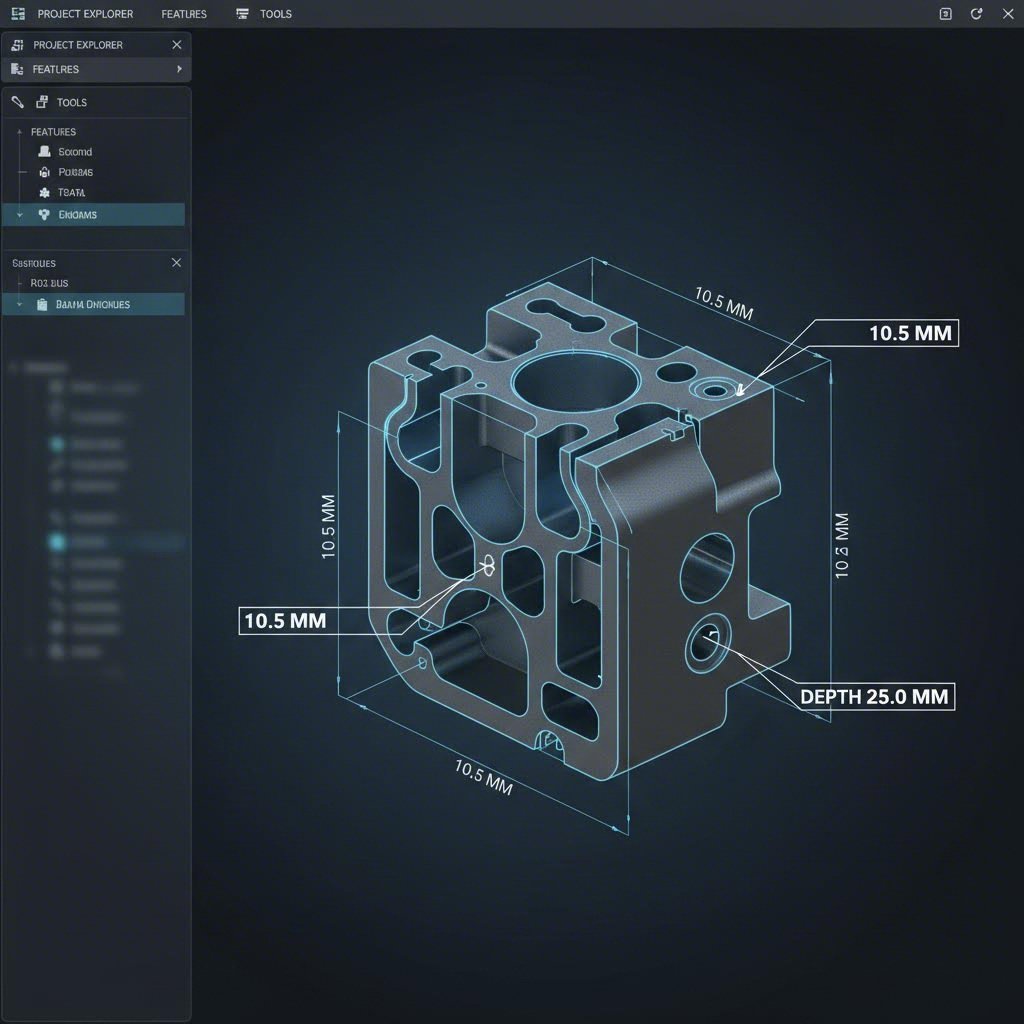
Understanding tolerances and finishes gives you control over quality—but what about the geometry itself? The shape of your part determines whether it can be machined efficiently, affordably, or even at all. This is where Design for Manufacturability (DFM) enters the picture. Master these principles, and you'll avoid costly redesigns while getting better cnc machining parts at lower prices.
Design Rules That Reduce Machining Costs
Every feature on your part requires machine time. Some features cut quickly and cleanly. Others force the machine to slow down, switch tools multiple times, or execute complex operations that extend cycle time. The difference between a $50 part and a $200 part often comes down to design decisions made before you ever upload your CAD file.
Start with these fundamental guidelines that keep cnc machine parts economical:
- Add radii to internal corners: CNC milling cutters are cylindrical—they physically cannot create sharp 90° internal corners. According to Geomiq's design guide, you should add an internal radius at least 30% larger than your cutting tool's radius. For example, if your shop uses a 10 mm end mill, design internal corners with a 13 mm radius minimum. This reduces tool stress, enables faster cutting speeds, and extends tool life.
- Limit cavity depths: End mill tools typically have a cutting length of 3–4 times their diameter. Deeper cavities require longer, thinner tools that deflect and vibrate, reducing accuracy and surface quality. Keep cavity depth to a maximum of four times the cavity width for reliable results.
- Use standard hole sizes: Standard drill bits cut holes quickly and accurately. Non-standard diameters force machinists to use end mills, progressively removing material—a slower, costlier process. Stick to standard drill sizes (0.5 mm to 38 mm range) whenever possible.
- Maintain adequate wall thickness: Thin walls vibrate during cutting, causing poor surface finish and dimensional inaccuracy. Industry recommendations suggest minimum wall thickness of 0.8 mm for metals and 1.6 mm for plastics. For cnc plastic machining, the higher requirement accounts for material softening during cutting.
- Keep thread depths reasonable: Thread strength concentrates in the first few engaged threads. Design threaded holes with a maximum depth of three times the hole diameter. For blind holes, leave an unthreaded section equal to half the hole diameter at the bottom.
Following these rules doesn't limit your design freedom—it channels it. You can still create sophisticated custom machined parts while respecting the physical realities of how cutting tools interact with material.
Common Mistakes That Make Parts Expensive
Want to watch your quote triple overnight? These design errors will do it. Understanding why they're problematic helps you avoid them in future projects.
Overspecifying tolerances: We covered this in the previous section, but it bears repeating in the DFM context. When you tolerance every dimension tightly, you signal to the manufacturer that extreme precision is required everywhere—triggering slower feeds, additional finishing passes, and comprehensive inspection. According to Geomiq, CNC milling and turning typically achieve ±0.13 mm accuracy by default. That's precise enough for most applications.
Designing features that require EDM: Certain geometries simply cannot be created with conventional rotating cutters. Sharp internal corners, complex internal channels, and extremely deep narrow slots may require electrical discharge machining (EDM)—a much slower and costlier process. Before finalizing your design, ask yourself: can a spinning cutter reach this surface?
Including unnecessary aesthetic features: Decorative patterns, embossments, engravings, and complex lettering add machining time without functional benefit. If aesthetics matter for your application, include them deliberately. But for cnc prototype parts intended for functional testing, strip away the decoration and save it for production tooling.
Ignoring width-to-height ratios on walls: Tall, thin walls are machining nightmares. They deflect under cutting forces, chatter during finishing, and may even crack. Best practice recommends a width-to-height ratio of 3:1 for unsupported walls. A wall that's 1 mm thick should stand no taller than 3 mm without additional support features.
Specifying unnecessarily smooth surface finishes: Machining time and cost increase exponentially as surface roughness requirements tighten. Default CNC finishes of 3.2 µm Ra work for most applications. Surfaces requiring 0.8 µm or smoother should be limited to sealing faces, bearing surfaces, or optical interfaces where function genuinely demands it.
Optimizing Your CAD Files for CNC Success
Your design might be perfect on screen, but manufacturing success depends on how you communicate that design to the machine shop. Here's a checklist for preparing CAD files that translate smoothly into cnc milling parts:
- Export in universally accepted formats: STEP (.stp) files are the industry standard for CNC quoting platforms. They preserve 3D geometry accurately and work across virtually all CAM systems. IGES files work too, though STEP is preferred. Avoid proprietary formats unless your manufacturer specifically requests them.
- Include clear tolerance callouts: Critical dimensions should appear on a 2D drawing accompanying your 3D model. Specify tolerances only where function requires them—let standard tolerances apply elsewhere.
- Indicate material and finish requirements: Don't assume the manufacturer will guess correctly. Specify your material grade (6061-T6 aluminum, not just "aluminum"), required surface finish, and any secondary operations like anodizing or bead blasting.
- Check for watertight geometry: Gaps between surfaces, overlapping bodies, or open edges confuse CAM software. Run your CAD system's repair or analysis tools before exporting to catch these issues early.
- Choose engraved text over embossed: If your part requires lettering, engraved text removes less material and machines faster than raised embossed characters. Use Sans-serif fonts (Arial, Verdana) at 22 points or larger for best results, as recommended by industry CAD guidelines.
- Consider part orientation: Think about how your part will be fixtured. Flat, stable surfaces make good bases for workholding. If your design lacks these, you may face additional setup charges for custom fixtures.
When you upload a well-prepared file to a CNC machine online platform, the automated quoting system can analyze your geometry accurately. Poorly prepared files generate warnings, require manual review, and delay your quote—or worse, lead to manufacturing issues that only surface when parts arrive.
The investment you make in proper DFM pays dividends throughout your project. Parts quote lower, manufacture faster, and arrive fitting their intended application. And when it comes time to scale from cnc prototype quantities to production volumes, manufacturers appreciate working with designers who understand manufacturability constraints.
Speaking of costs—now that you understand how design decisions affect machining, let's examine what actually drives pricing when you order parts through online platforms.
Understanding CNC Machining Pricing Factors
You've uploaded your CAD file to a CNC machine online platform and received an instant quote. But what's actually behind that number? Most services offer immediate pricing without explaining what drives those costs—leaving you wondering whether you're getting a fair deal or how to reduce your cnc machining price on future orders. Let's pull back the curtain on what actually determines how much you'll pay.
What Actually Drives CNC Machining Costs
When you request a machine shop quote, several factors combine to generate your final price. Understanding these elements—listed here in order of typical impact—empowers you to make smarter design and ordering decisions:
- Machining time: This is usually the largest cost driver. According to Komacut's pricing analysis, CNC machine shop rates vary significantly by equipment type—3-axis mills cost less per hour than 5-axis centers. Complex geometries, deep pockets, and intricate features all extend cycle time and increase your bill.
- Setup and programming (NRE costs): Before any cutting begins, someone must program toolpaths, select appropriate tools, and fixture your part securely. These non-recurring engineering costs get spread across your order quantity. A $200 setup on a single prototype means $200 per part. That same setup on 50 parts drops to just $4 each.
- Material costs: Raw material prices vary dramatically. Fictiv notes that choosing the cheapest material that meets your design requirements is the simplest path to savings. Aluminum typically costs less than steel, while specialty alloys like titanium can run 10-20 times higher than common metals.
- Tolerance requirements: Tighter tolerances demand slower cutting speeds, additional finishing passes, and comprehensive inspection. Moving from standard ±0.1mm to precision ±0.025mm can increase costs by 50% or more.
- Secondary operations: Surface treatments like anodizing, bead blasting, heat treatment, or powder coating add processing steps—and cost. Each operation requires handling, inspection, and often outsourcing to specialized facilities.
The relationship between these factors isn't always intuitive. A small cnc machining project with complex geometry might cost more than a larger, simpler part—even when material costs suggest otherwise.
How Quantity Affects Per-Part Pricing
Here's where online machining quotes become interesting. Order a single prototype, and you'll absorb the full setup cost alone. Order ten parts, and that same setup spreads across all units, dramatically reducing your per-piece price.
According to industry pricing data, the economics work in two ways. First, fixed costs like programming and machine preparation get amortized over more units. Second, bulk material purchases often attract supplier discounts, further lowering expenses.
But there's a strategic balance to strike. Ordering 100 parts when you only need 10 might reduce your unit cost—but you've paid for 90 parts sitting in a drawer. For prototypes requiring iteration, smaller quantities make sense despite higher per-part pricing. For validated production designs with steady demand, larger batches maximize value.
When requesting a cnc quote online, try entering different quantities to see how pricing scales. Most platforms show you this relationship instantly, helping you find the sweet spot between unit cost and total investment.
Hidden Costs to Watch For
Beyond the obvious line items, several factors can quietly inflate your final bill:
- Special fixturing: Parts with complex or organic geometry may require custom-machined jaws or specialized holding devices. Fictiv warns that soft jaws for unusual geometries and sine bars for angled features add significant expense. Design flat, stable surfaces for workholding whenever possible.
- Multiple setups: Each time your part must be repositioned in the machine, someone stops production, removes the part, fixtures it differently, and re-establishes datum positions. Aim for designs that machine completely in one or two setups.
- Material waste: CNC is subtractive—you're buying stock larger than your finished part, and the difference becomes chips on the floor. Hollow designs or shapes requiring thick starting blocks generate more waste (and higher material costs) than compact geometries.
- Inspection and documentation: Need a first article inspection report? Certificates of material compliance? These quality documentation requirements add labor and processing time to your order.
- Expedited shipping: That one-week lead time might be achievable, but rush processing and overnight freight add premium charges that can approach the machining cost itself.
The most effective cost reduction comes from understanding these drivers before you finalize your design. A machinist metal cost calculation shows that spending an extra hour optimizing your CAD file for manufacturability often saves far more in production than it costs in engineering time.
Armed with this pricing knowledge, you're better positioned to evaluate quotes intelligently. But how do you know if the shop behind that quote can actually deliver quality parts? That's where certifications and quality standards come into play.
Quality Standards and Certifications Explained
You've found a CNC machine online platform offering competitive pricing and fast turnaround. But how do you know they can actually deliver reliable, repeatable quality? This is where certifications become your evaluation shortcut. Rather than auditing a manufacturer's processes yourself, industry certifications signal that independent third parties have already verified their quality systems meet rigorous standards.
Quality Certifications That Matter
Not all certifications carry equal weight—and not every project requires the same credentials. Understanding what each certification guarantees helps you match precision machining companies to your specific requirements.
- ISO 9001: The foundational quality management system certification. According to Machine Shop Directory, 67% of OEMs require ISO 9001 certification from their suppliers. This standard ensures documented processes, consistent procedures, and a commitment to continuous improvement. For general machining services, ISO 9001 represents the baseline credential you should expect.
- IATF 16949: The automotive industry's quality standard, building upon ISO 9001 with additional requirements specific to vehicle component manufacturing. This certification mandates defect prevention, reduction of variation, and waste elimination throughout the supply chain. Providers holding this credential demonstrate capabilities suited for automotive-grade precision machining service.
- AS9100: The aerospace equivalent, adding stringent requirements for traceability, configuration management, and risk mitigation. Aerospace cnc machining demands this certification—full stop. Without it, your parts cannot enter most aerospace supply chains regardless of their dimensional accuracy.
- ISO 13485: The quality management standard for medical machining applications. This certification addresses unique medical device requirements including design controls, sterilization validation, and biocompatibility considerations.
- ITAR Registration: Not a quality certification per se, but essential for defense-related work. ITAR (International Traffic in Arms Regulations) registration permits a manufacturer to handle controlled technical data and defense articles. Without it, many aerospace and defense contracts remain off-limits.
As one shop owner noted in industry research: "Certifications show our clients we're serious about quality. They're not just paperwork—they're a commitment to excellence in every part we make."
Industry-Specific Standards Explained
Why do different industries require different certifications? Because each sector faces unique risks and regulatory environments.
Aerospace components may fly for decades under extreme stress—failures can be catastrophic. AS9100 addresses this through enhanced traceability requirements that track every material lot, every process parameter, and every operator involved in manufacturing. If a problem emerges years later, investigators can trace it back to root causes.
Automotive manufacturing operates on different pressures: massive volumes, thin margins, and zero tolerance for production disruptions. IATF 16949 certification emphasizes Statistical Process Control (SPC)—the practice of monitoring key dimensions throughout production runs to catch drift before parts go out of specification. SPC protocols ensure consistent quality across thousands or millions of components, preventing costly line shutdowns at assembly plants.
Medical device manufacturing adds patient safety to the equation. ISO 13485 requires documented risk analysis, validated cleaning and sterilization processes, and complete lot traceability. When a medical machining component enters a patient's body, regulators need confidence in every step of its creation.
Evaluating Service Provider Credentials
When comparing CNC service providers, certifications offer objective evaluation criteria. But dig deeper than just checking boxes:
- Ask about inspection capabilities: What measurement equipment do they use? Coordinate Measuring Machines (CMMs), optical comparators, and surface roughness testers indicate serious quality infrastructure. Precision machining companies invest heavily in metrology.
- Request sample inspection reports: Reputable providers willingly share example documentation showing how they verify dimensional accuracy. First Article Inspection (FAI) reports demonstrate their process for validating new parts against drawings.
- Verify certification currency: Certifications require periodic audits—typically annual surveillance audits plus full recertification every three years. Confirm their certificates haven't lapsed.
- Understand their SPC practices: For production quantities, ask how they monitor process capability. Control charts, Cpk measurements, and documented corrective action procedures indicate mature quality systems.
For automotive applications specifically, providers like Shaoyi Metal Technology demonstrate how IATF 16949 certification combined with strict SPC protocols ensures consistent quality across high-tolerance components. Their approach—integrating statistical monitoring throughout production rather than relying solely on final inspection—exemplifies the quality infrastructure serious automotive suppliers maintain.
Certifications cost time and money to achieve and maintain. Shops with industry-specific credentials have already invested in the processes, training, and equipment necessary to meet demanding requirements. That investment translates into confidence that your cnc service provider can deliver parts meeting your specifications—not just on the first order, but consistently over time.
Quality credentials establish baseline trust. But how does CNC machining compare to alternative manufacturing methods when you're deciding how to produce your parts in the first place?
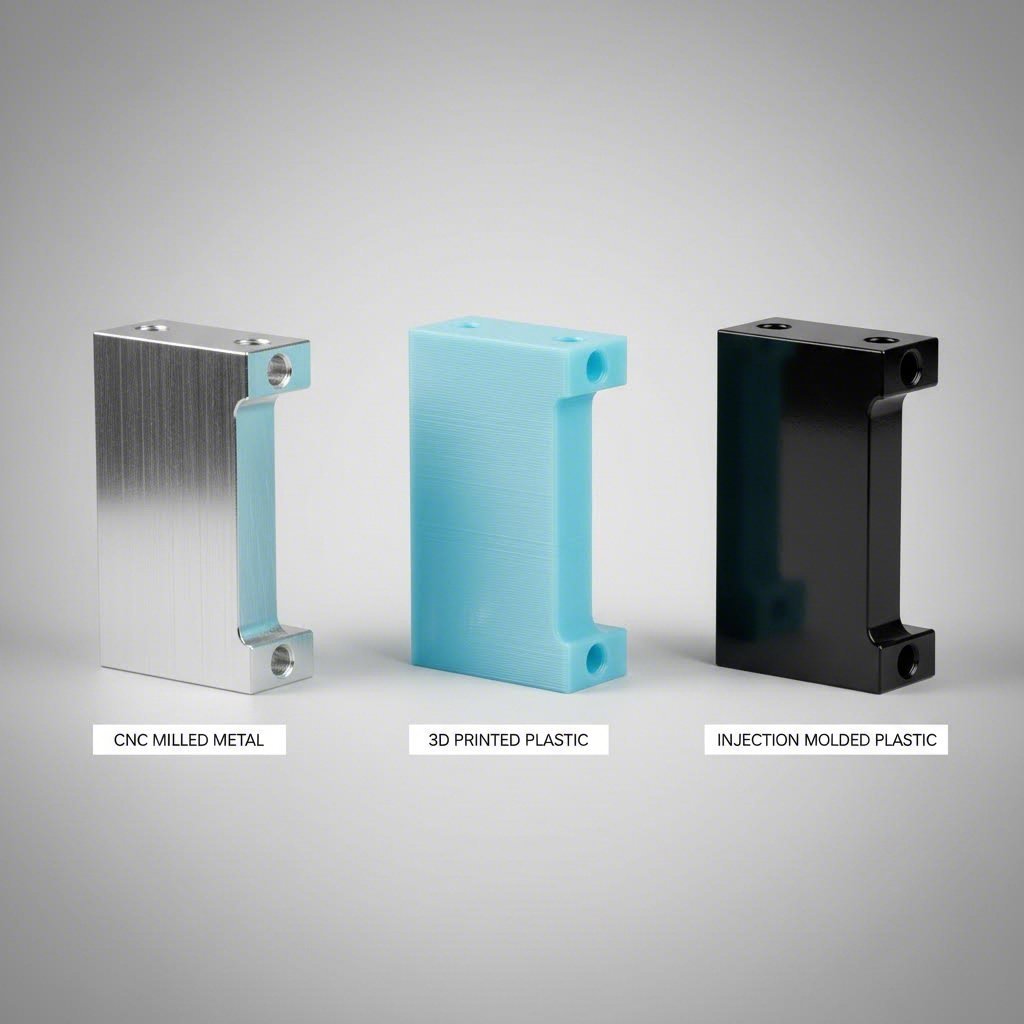
CNC Machining Versus Alternative Methods
You understand quality certifications and what they guarantee. But here's a fundamental question many engineers and designers wrestle with: should you even use CNC machining for your project? Sometimes the answer is yes. Sometimes 3D printing, injection molding, or casting makes more sense. Choosing the wrong method wastes money and time—so let's break down when each approach shines.
CNC Versus 3D Printing for Prototypes
When you need a prototype fast, both CNC machining and 3D printing can deliver. But they excel in different scenarios.
3D printing builds parts layer by layer from the bottom up. This additive approach creates complex internal geometries, lattice structures, and organic shapes that would be impossible to machine. According to RevPart's comparison data, a 5" x 6" x 3" part costs approximately $120-140 in 3D-printed ABS, versus $150-180 for the same size in CNC-machined material.
So why consider cnc prototype machining at all? Because prototype machining delivers parts in production-grade materials with mechanical properties you can trust. 3D-printed plastics often exhibit layer lines, reduced strength along the Z-axis, and limited material options. CNC prototyping produces parts from the exact same aluminum, steel, or engineering plastic you'll use in final production—meaning your functional testing reflects real-world performance.
Here's a practical decision framework:
- Choose 3D printing when: You need complex internal channels, lattice structures for lightweighting, or rapid design iteration where appearance matters less than speed. It's also ideal when your geometry would require 5-axis machining or multiple setups.
- Choose cnc machining prototyping when: Material properties must match production intent, tight tolerances are essential, or your part requires metal. CNC prototype machining also wins when surface finish matters—machined parts typically have smoother surfaces than printed ones without secondary polishing.
As Protolabs explains, 3D printing is "perfect for rapid prototyping; its quick turnaround times and lower costs in relation to other processes make it perfect for quick iteration." But that speed advantage diminishes when you need functional validation in real materials.
When Injection Molding Makes More Sense
Injection molding works by forcing molten plastic into a precisely machined mold cavity. Once cooled, parts eject ready for use. The catch? You must first create that mold—and molds aren't cheap.
According to RevPart's pricing comparison, prototype injection molds start around $2,000 and up, with individual parts costing just $2.50-3.00 each. Compare that to CNC machining at $150-180 per part for the same geometry. The economics flip dramatically based on quantity.
Consider the crossover point. If your mold costs $2,000 and each molded part costs $3, while each machined part costs $150:
- At 10 parts: Molding = $2,030 total ($203/part) vs. CNC = $1,500 ($150/part). CNC wins.
- At 20 parts: Molding = $2,060 ($103/part) vs. CNC = $3,000 ($150/part). Molding wins.
- At 100 parts: Molding = $2,300 ($23/part) vs. CNC = $15,000 ($150/part). Molding wins decisively.
According to Hubs' production guide, injection molding excels when you need "plastic parts with undercuts, thin walls, or otherwise complex geometries" in high volumes. The process also delivers superior surface finishes straight from the mold—often eliminating secondary operations entirely.
But injection molding demands design commitment. Changing a mold means scrapping expensive tooling and starting over. For evolving designs or low quantities, a cnc prototyping service offers flexibility that molding can't match.
Choosing the Right Manufacturing Method
Each manufacturing approach carries distinct strengths. The table below compares your options across the factors that matter most when selecting a process:
| Factor | CNC Machining | 3D Printing | Injection Molding | Die Casting |
|---|---|---|---|---|
| Best Quantity Range | 1-500 parts | 1-50 parts | 500+ parts | 1,000+ parts |
| Material Options | Metals, plastics, composites—widest range | Limited plastics, some metals via DMLS | Thermoplastics only | Non-ferrous metals (aluminum, zinc, magnesium) |
| Typical Lead Time | 3-10 business days | 1-5 business days | 2-4 weeks (including mold) | 4-8 weeks (including die) |
| Cost Structure | Low setup, moderate per-part | No setup, low per-part for small quantities | High tooling, very low per-part | Very high tooling, lowest per-part |
| Precision Level | ±0.025mm achievable | ±0.1-0.3mm typical | ±0.05mm achievable | ±0.1mm typical; CNC finishing for tighter |
Notice how the "best" method depends entirely on your specific situation. Rapid cnc prototyping makes sense for functional testing in production materials. Carbon fiber prototyping via CNC enables lightweight aerospace components that 3D printing can't match structurally. Injection molding dominates high-volume consumer products. Die casting serves automotive and industrial applications requiring millions of identical metal parts.
As Hubs notes, "If your parts must be extremely precise, or have very tight tolerances, you may want to consider CNC machining, as it is capable of degrees of accuracy that even injection molding can't achieve." This precision advantage keeps CNC machining relevant even at higher volumes for critical components.
The smartest approach? Match method to purpose:
- Early concept validation: 3D printing for speed and low cost
- Functional prototypes: CNC machining for production-representative properties
- Low-volume production: CNC machining for flexibility without tooling investment
- High-volume production: Injection molding (plastics) or die casting (metals) for lowest unit cost
Many successful products use multiple methods across their lifecycle. Start with 3D-printed concepts, validate with cnc machined prototypes, then transition to injection molding for production. Each method serves its purpose in the journey from idea to market.
With manufacturing method selected, you're ready to navigate the actual ordering process—uploading files, reviewing quotes, and managing your project through to delivery.
How to Order CNC Parts Online Successfully
You've selected your manufacturing method, understand quality standards, and know what drives pricing. Now comes the practical part: actually placing an order through a CNC machine online platform. What happens after you click "upload"? How long will it really take? And how do you scale from a single prototype to production quantities without starting from scratch? Let's walk through the complete workflow.
The Online Ordering Workflow Step by Step
Whether you're searching for "cnc machining near me" or working with a global platform, online cnc machining services follow a remarkably consistent process. Understanding each stage helps you avoid delays and set realistic expectations.
- Upload your CAD file: Start by uploading your 3D model—typically a STEP (.stp) file for best compatibility. According to Xometry's ordering guide, sophisticated quoting engines analyze your geometry within seconds, identifying features, calculating material removal, and estimating machining time.
- Select material and finish options: Choose from available materials (aluminum, steel, plastics, etc.) and specify surface treatments. Your selections directly impact both price and lead time.
- Receive instant quote: The platform generates pricing based on geometry complexity, material costs, tolerances, and current shop capacity. You'll see options for different quantities and lead times.
- Review DFM feedback: Many platforms provide automated Design for Manufacturability analysis. Pay attention to warnings about thin walls, deep pockets, or features requiring special tooling—these insights prevent manufacturing failures.
- Submit order and approve final specifications: Confirm tolerances, material certifications, and inspection requirements. For critical parts, upload 2D drawings with specific callouts.
- Production begins: Your job enters the manufacturing queue. The shop programs toolpaths, selects cutting tools, and fixtures your part for machining.
- Quality inspection: Completed parts undergo dimensional verification. Standard inspections check critical features; enhanced inspection packages provide full CMM reports.
- Shipping and delivery: Parts are cleaned, packaged, and shipped to your location. Tracking information keeps you informed throughout transit.
The entire process—from upload to doorstep—can happen in days rather than weeks. But "can" and "will" depend on several factors you need to understand.
Realistic Timeline Expectations
Online platforms often advertise impressively short lead times. Xometry states a standard lead time of 3 business days for many parts, with expedite options available. But before banking on that timeline, consider what actually influences delivery schedules.
According to Miens Technology's analysis, lead time depends on interconnected factors:
- Part complexity: Simple geometries with standard features move through production quickly. Complex designs requiring multiple setups, custom tooling, or multi-axis machining extend cycle times significantly.
- Material availability: Common materials like 6061 aluminum and 303 stainless steel ship from stock. Exotic alloys, specialty plastics, or unusual tempers may require procurement that adds days or weeks.
- Tolerance requirements: Tighter tolerances demand slower cutting speeds, additional finishing passes, and more rigorous inspection—all extending lead time.
- Secondary operations: Heat treatment, anodizing, plating, or powder coating add processing steps. Outsourced finishing operations can extend delivery by a week or more.
- Shop capacity: High demand periods mean your job waits in queue. Production capacity constraints during peak seasons can stretch timelines beyond quoted estimates.
Here's what competitors don't always explain: quoted lead times typically assume ideal conditions. A "3-day" lead time means 3 days of machining once your job reaches the front of the queue, materials are in hand, and no design issues surface during review. Add order processing, potential DFM iterations, and shipping transit time for a complete picture.
For realistic planning, consider these typical ranges:
| Project Type | Typical Lead Time | Key Variables |
|---|---|---|
| Simple prototype (standard material) | 3-5 business days | File quality, material stock |
| Complex prototype (tight tolerances) | 5-10 business days | Inspection requirements, setups needed |
| Production batch (10-50 parts) | 7-14 business days | Quantity, secondary operations |
| High-volume production (100+ parts) | 2-4 weeks | Capacity, quality documentation |
Expedited services exist but come at premium pricing. If your project timeline is genuinely critical, communicate that upfront and budget for rush fees rather than hoping standard timelines compress magically.
From Prototype to Production Scaling
Perhaps you've ordered a successful prototype. Parts fit, functions work, testing passes. Now you need 500 units for initial production—or 5,000 for full market launch. How does that transition work with cnc turning services and milling providers?
The good news: scaling through online platforms is often smoother than traditional machine shops. Your CAD files, material specifications, and quality requirements already exist in the system. Reordering leverages that documented history.
However, scaling introduces new considerations:
- Process optimization: What worked for one prototype may not be the most efficient approach for 500 parts. Manufacturers often review tooling strategies, fixture designs, and machining sequences to reduce per-part cycle time at volume.
- Quality systems: Production quantities typically require Statistical Process Control (SPC) rather than 100% inspection. Ask how your provider monitors dimensional consistency across batches.
- Material procurement: Larger orders may benefit from bulk material purchasing—but also require longer lead times for raw stock delivery.
- Supply chain reliability: For ongoing production, you need a partner who can deliver consistently over time, not just execute a single order successfully.
This scaling challenge is where searching for "cnc shop near me" or "cnc machine shop near me" sometimes falls short. Local shops may handle prototype volumes excellently but lack capacity for production scaling. Conversely, high-volume specialists may not prioritize your single-unit prototype orders.
The solution? Work with providers who explicitly serve both ends of the spectrum. For automotive applications, providers like Shaoyi Metal Technology demonstrate this capability—offering lead times as fast as one working day for high-tolerance components while maintaining the IATF 16949 certification and SPC infrastructure needed for production-scale automotive supply chain demands. This range—from rapid prototyping to certified production—eliminates the painful transition between development and manufacturing partners.
When evaluating "machining shops near me" against online platforms, consider the complete journey. A local relationship offers face-to-face communication and quick pickup for urgent prototypes. Online platforms provide broader capacity, often better pricing through network competition, and systems designed for scaling. Many successful product teams use both: local shops for early-stage iteration where speed and communication matter most, transitioning to certified production partners once designs stabilize.
The key is matching your current stage to the right resource. Don't overpay for production-grade quality systems when you're still iterating concepts. But don't underinvest in quality infrastructure when you're ready to ship products to customers who depend on consistent performance.
From uploading your first CAD file to receiving production shipments at your dock, online CNC machining services have transformed what's possible for designers, engineers, and manufacturers of all sizes. Understanding the workflow, setting realistic timeline expectations, and choosing partners who can grow with you—that's how you turn digital designs into physical reality, successfully.
Frequently Asked Questions About CNC Machine Online Services
1. What is the hourly rate for a CNC machine?
CNC machine hourly rates vary significantly by equipment type and location. 3-axis mills typically cost $25-50 per hour, while 5-axis machining centers can run $75-120 or more per hour. Factors affecting rates include machine complexity, operator skill requirements, and shop overhead. For online CNC services, pricing is often calculated per-part rather than hourly, with algorithms analyzing geometry, material, and tolerances to generate instant quotes that bundle all costs together.
2. Is there free CNC software available?
Yes, several free CAM software options exist for CNC machining. Autodesk offers Fusion 360 for personal use, providing integrated CAD and CAM capabilities for hobbyists and students. Other free options include FreeCAD with Path workbench and Openbuilds CAM for basic 2D operations. However, when using online CNC machining services, you typically only need CAD software to create your design—the service provider handles CAM programming and toolpath generation as part of their manufacturing process.
3. How thick of material can a CNC machine cut through?
CNC machines can cut various thicknesses depending on material type and machine specifications. CNC routers typically handle wood up to 2 inches thick, while CNC mills can machine aluminum blocks several inches deep. For steel, standard VMCs work with stock 4-6 inches thick, and specialized machines handle even more. Online CNC services often specify maximum part dimensions—commonly 24x18x10 inches for milling—so check platform limits when uploading designs for thicker materials.
4. How long does it take to get CNC parts from online services?
Online CNC machining lead times typically range from 3-14 business days depending on complexity, material availability, and quantity. Simple prototypes in standard aluminum may ship in 3-5 days, while complex parts with tight tolerances or secondary operations like anodizing take 7-14 days. Some providers offer expedited options with lead times as fast as one working day for urgent projects, though premium pricing applies. Material procurement for exotic alloys can add additional time.
5. What file formats do online CNC services accept?
STEP (.stp) files are the industry standard for online CNC quoting platforms, offering universal compatibility and accurate geometry preservation across CAM systems. IGES files also work well. Most platforms additionally accept native CAD formats like SolidWorks, Inventor, and Fusion 360 files. For complete specifications, include 2D drawings in PDF format with critical tolerances and callouts. Avoid mesh files like STL for CNC machining—these lack the precise surface data needed for accurate toolpath generation.