 Small batches, high standards. Our rapid prototyping service makes validation faster and easier —
  EN
EN


CO2 проти волоконного проти кристалічного лазера: яка технологія лазерного різання підходить саме для вашого проекту
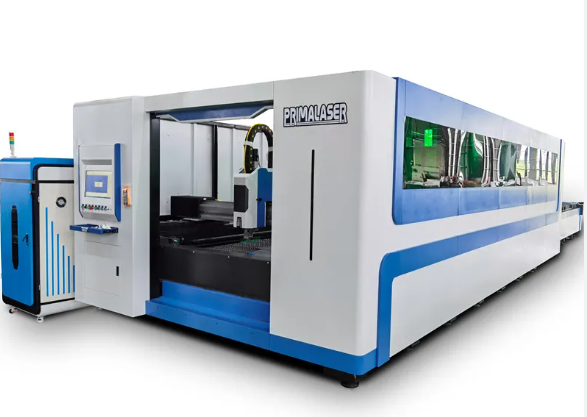
Що таке майстерня лазерного різання та як вона працює
Чи замислювались ви коли-небудь, як виготовляють складні металеві вивісок, точно вирізані акрилові дисплеї чи спеціальні автозапчастини з такою бездоганною точністю? Відповідь часто полягає у майстерні лазерного різання — спеціалізованому підприємстві, оснащеному передовим обладнанням, що перетворює сировинні матеріали на точні компоненти за допомогою концентрованих світлових променів.
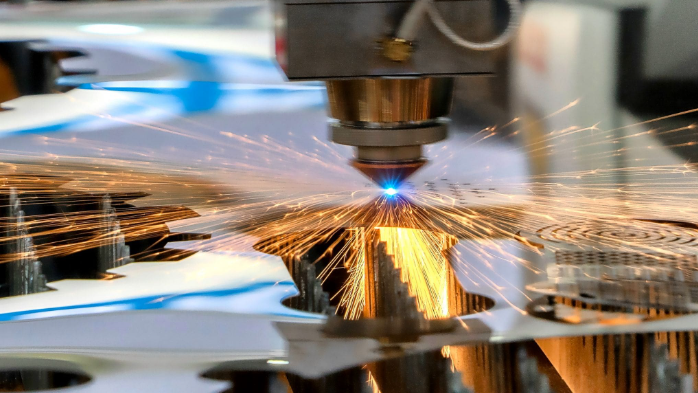
Простими словами, такі підприємства використовують потужні лазери для різання, формування та індивідуального оброблення матеріалів — від нержавіючої сталі до дерева. Ця технологія працює шляхом фокусування інтенсивного лазерного променя на поверхні матеріалу , нагріваючи його до температури, при якій матеріал плавиться, обвуглюється або випаровується по точно заданій траєкторії. У результаті залишається чистий зріз із мінімальним тепловим спотворенням і практично без втрат матеріалу.
Такі майстерні пропонують набагато більше, ніж просто різання. Ось основні можливості, які зазвичай доступні:
- Розріз: Різання матеріалів із надзвичайною точністю, створення деталей від простих форм до складних геометрій
- Гравірування: Видалення матеріалу для створення постійних зображень, логотипів або тексту під поверхнею
- Етчинг: Нанесення позначок на поверхні без глибокого видалення матеріалу
- Маркування: Створення видимих змін на поверхнях для ідентифікації, брендування або декоративних цілей
Від промислових підлог до вашого порогу
Історія розвитку технології лазерного різання нагадує захоплюючу історію еволюції. Коли Теодор Майман створив перший діючий лазер у 1960 році , небагато хто уявляв, що він згодом стане доступним для малих підприємств та любителів. Десятиліттями ці верстати залишалися «закритими» в авіа- та космічних центрах і великих виробничих підприємствах — масивним, дорогим обладнанням, яке могли собі дозволити лише великі корпорації.
Швидке перемотування до сьогоднішнього дня — і ландшафт виглядає дуже інакше. Те, що колись було ексклюзивною промисловою технологією, тепер стало доступним усім. Сучасні послуги лазерного різання зараз орієнтуються на клієнтів від компаній із рейтингу Fortune 500 до любителів, які вихоплюють час у вихідні для реалізації своїх проєктів. Ви знайдете лазерний різак, який виконує завдання від розробки прототипів до повномасштабного виробництва, а замовлення онлайн робить процес таким простим, як завантаження файлу з кресленням.
Технологія, що забезпечує точне різання
Що ж таке лазерне різання в його основі? Уявіть собі фокусування сонячного світла за допомогою збільшувального скла — але з підсиленням у тисячі разів. Лазерний промінь, що генерується CO₂-, волоконними або кристалічними лазерними джерелами, фокусується за допомогою спеціалізованих оптичних систем у надзвичайно вузьку точку. Ця концентрована енергія нагріває матеріали з такою точністю, що ширина різу може бути меншою за людську волосину.
Процес починається з вашого файлу проекту — зазвичай створеного в програмному забезпеченні САПР, — який передається в комп’ютерну систему числового програмного керування (ЧПК). Ця автоматизація забезпечує точне відтворення кожного розрізу відповідно до заданих специфікацій, незалежно від того, чи виготовляється одна деталь, чи тисяча. Результат? Індивідуальне лазерне гравірування та різання з такою стабільністю, яку ручні методи просто не можуть забезпечити.
Хто сьогодні користується послугами лазерного різання
Коло клієнтів, що користуються послугами лазерного різання та гравірування, значно розширилося. Виробники звертаються до таких майстерень за компонентами для виробництва. Архітектори замовляють індивідуальні архітектурні елементи. Художники створюють складні скульптури. Власники малих підприємств виготовляють брендовану продукцію. Навіть любителі, які шукують «послуги лазерного гравірування поруч ізі мною», тепер мають доступ до результатів професійного рівня.
Чи вам потрібен один окремий прототип, чи тисячі ідентичних деталей — розуміння того, як працюють ці виробничі потужності, дозволяє краще використовувати їхні можливості для задоволення специфічних потреб вашого проекту.
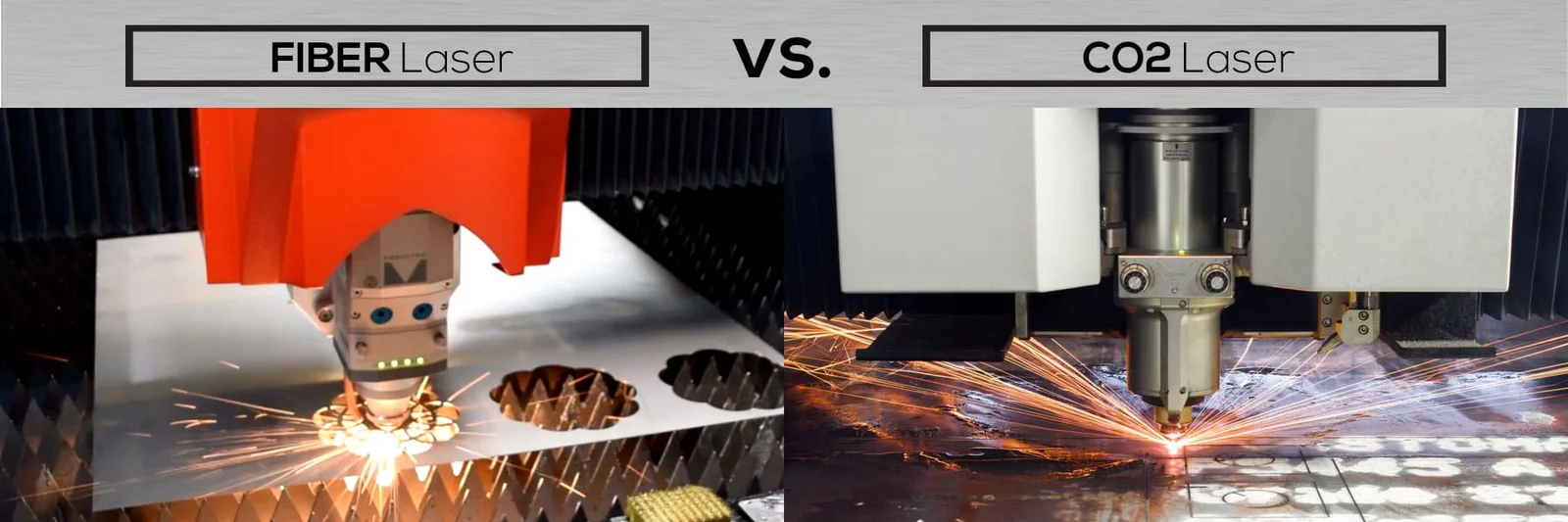
Розуміння технологій CO₂-волоконних та кристалічних лазерів
Тепер, коли ви знаєте, що пропонують ці виробничі потужності, давайте розглянемо технології, які роблять усе це можливим. Не всі лазери однакові — і розуміння різниці між CO₂-, волоконними та кристалічними лазерними системами може заощадити вам час, гроші й уникнути роздратування під час вибору відповідного цеху лазерного різання для вашого проекту.
Подумайте про це так: вибір типу лазера подібний до вибору потрібного інструменту з набору інструментів. Молоток чудово підходить для забивання цвяхів, але зовсім непридатний для гвинтів. Аналогічно, кожна лазерна технологія має свої переваги при обробці певних матеріалів та в конкретних застосуваннях. Розуміння цих відмінностей допомагає ефективно спілкуватися з постачальниками послуг і забезпечує відповідне призначення вашого проекту на оптимальному обладнанні.
Лазери CO2 для органічних матеріалів
Лазери на CO2 є робочою кінькою галузі вже десятиліттями, і на те є чудові причини. Ці газові лазери працюють шляхом електричного збудження суміші газу двокису вуглецю для отримання лазерного променя з довжиною хвилі 10,6 мікрометра . Ця більша довжина хвилі робить їх надзвичайно ефективними для неметалевих матеріалів.
Що це означає для ваших проектів? Якщо ви працюєте з деревом, акрилом, склом, папером, текстилем, шкірою або більшістю пластиків, CO2-лазер для застосувань у машинах для різання забезпечує виняткові результати. Промінь забезпечує чисте різання з мінімальним обвуглюванням органічних матеріалів, а робота з акрилом часто дає характерні поліровані, блискучі краї — це перевага для застосувань у виготовленні вивісок та дисплеїв.
Однак системи на CO2 мають певні обмеження. Вони погано справляються з відбивними металами й вимагають більшої технічної обслуги порівняно з новішими альтернативами. Машина з CO2-лазером для різання металу може виконувати певні металообробні операції, але, як правило, працює повільніше й менш ефективно, ніж волоконні аналоги для цих цілей.
Волоконні лазери для обробки металів
Коли метал є вашим основним матеріалом, послуги різання металів волоконними лазерами є «золотим стандартом». Ці твердотільні лазери генерують лазерний промінь за допомогою спеціально розроблених скляних волокон, які підсилюються накачувальними діодами, і створюють довжину хвилі 1,064 мікрометра — приблизно в десять разів коротшу, ніж у CO₂-лазерів.
Чому важлива довжина хвилі? Коротша довжина хвилі забезпечує надзвичайно малий діаметр фокусу та інтенсивність, що в 100 разів перевищує інтенсивність CO₂-лазерів при однакових рівнях потужності. Це означає більш високу швидкість різання, вищу точність та чудову ефективність при обробці відбивних матеріалів, таких як алюміній, латунь і мідь, з якими CO₂-системи часто мають труднощі.
З практичної точки зору, металевий лазерний різак із використанням волоконної технології має додаткові переваги: мінімальні вимоги до технічного обслуговування та термін служби понад 25 000 лазерних годин. Для будь-якого лазерного різального верстата для металів — незалежно від того, чи це вуглецева сталь, нержавіюча сталь чи титан — волоконна технологія, як правило, забезпечує найкращі результати.
Спеціалізованим варіантом, про який варто знати, є лазер MOPA, що характеризується регульованими тривалостями імпульсів. Ця гнучкість робить його одним із найбільш універсальних варіантів для різноманітних застосувань у межах одного лазерного різального верстата для металів.
Кристалічні лазери: спеціалісти з точності
Кристалічні лазери, зокрема Nd:YAG (неодим-допірований ітрий-алюмінієвий гранат) та Nd:YVO (неодим-допірований ітрий-ортованадат), займають спеціалізовану нішу. Як і волоконні лазери, вони випромінюють світло з тією самою довжиною хвилі — 1,064 мікрометра, що робить їх придатними для обробки металів і пластмас.
Компроміс? Кристалічні лазери включають накачувальні діоди, які потрібно замінювати після приблизно 8 000–15 000 годин роботи лазера — значно менше, ніж термін служби волоконних лазерів. Самі кристали також мають обмежений термін експлуатації. Хоча вони здатні забезпечити високу точність, особливо для маркування та гравірування, їх вищі вимоги до технічного обслуговування та вартість компонентів роблять їх менш поширеними у загального призначення машинах для лазерного різання металів.
Вибір правильного лазерного технологічного рішення для вашого проекту
Вибір відповідної технології зводиться до відповідності ваших вимог щодо матеріалу та застосування з можливостями лазера. У наведеній нижче порівняльній таблиці наведено основні відмінності:
| Тип лазера | Найкращі матеріали | Типова діапазон товщини | Характеристики швидкості | Ідеальні застосування |
|---|---|---|---|---|
| CO2 | Дерево, акрил, скло, папір, текстиль, шкіра, пластмаси, фольга | До 25 мм для неметалів; обмежена здатність різати метали | Помірна; відмінна якість лазерного променя | Виготовлення вивісок, дисплеїв, гравірування, різання неметалів, декоративні роботи |
| Волоконне | Вуглецева сталь, нержавіюча сталь, алюміній, мідь, латунь, титан | Тонкий лист до 2+ дюймів залежно від розміру верстата | Швидко; до 100-кратної інтенсивності CO₂ при однаковій потужності | Виготовлення виробів із листового металу, автозапчастини, промислові компоненти, відбиваючі метали |
| Кристал (Nd:YAG/Nd:YVO) | Метали, покриті метали, пластики, деякі керамічні матеріали | Переважно тонкі матеріали; орієнтовані на маркування | Точні, але вимагають частішого технічного обслуговування | Точне маркування, гравірування, спеціалізовані промислові застосування |
Під час консультації з постачальниками послуг різання волоконним лазером або будь-яким іншим постачальником уточнюйте, які саме типи лазерів вони використовують. Підприємство, що має як CO₂-, так і волоконні лазери, забезпечує гнучкість для проектів із різноманітних матеріалів, тоді як спеціалізовані майстерні можуть запропонувати глибші експертні знання в окремих категоріях матеріалів.
Розуміння цих технологічних основ підготує вас до прийняття обґрунтованих рішень — проте технологія є лише частиною рівняння. Не менш важливо знати, які матеріали найкраще поєднуються з кожним типом лазера та яких результатів ви можете реально очікувати.
Матеріали, які можна різати в майстерні лазерного різання
Ви обрали правильну лазерну технологію — але щодо матеріалів? Знання того, які матеріали сумісні з кожною системою, перетворює задовільні результати на виняткові. Розглянемо категорії матеріалів, з якими ви зустрінетесь, та очікувані результати від кожної з них.
Зв’язок між типом лазера та матеріалом полягає не лише в сумісності — це питання оптимізації. Волоконний лазер технічно здатен різати дерево, але не забезпечить чистих кромок, які надає CO₂-система. Аналогічно, спроба різати метал за допомогою CO₂-лазера призводить до втрат часу й отримання низькоякісних результатів. Наведені нижче рекомендації допоможуть вам підібрати матеріали до відповідної технології для досягнення оптимальних результатів .
Метали, які найкраще піддаються лазерному різанню
Лазерне різання металів є одним із найбільш вимогливих застосувань, для якого потрібні високопотужні волоконні лазери, щоб отримати найкращі результати. Доброю новиною є те, що сучасне обладнання здатне точно обробляти широкий спектр металевих матеріалів — з точністю, яку традиційні методи не можуть забезпечити.
Сталь та нержавіюча сталь: Ці метали залишаються найпоширенішими для обробки. Коли потрібно виконати лазерне різання нержавіючої сталі, волоконні лазери забезпечують чисті краї без оксидів — особливо коли в якості допоміжного газу використовується азот. Вуглецева сталь ефективно ріжеться в усьому діапазоні товщин — від тонкого листового металу до плит завтовшки понад один дюйм.
Алюміній: Лазерне різання алюмінію створює унікальні виклики через високу відбивну здатність і теплопровідність матеріалу. Однак сучасні високопотужні волоконні системи ефективно впораються з цими властивостями. Очікуйте трохи більшу ширину різі порівняно зі сталлю, але якість країв залишається відмінною для більшості застосувань.
Мідь і латунь: Ці високовідбивні матеріали раніше становили серйозну загрозу для лазерного обладнання — відбиті промені могли пошкодити оптичні компоненти. Сучасні спеціалізовані волоконні лазерні системи з відповідним рівнем потужності надійно ріжуть обидва матеріали, що відкриває нові можливості для виготовлення електричних компонентів, декоративних виробів та прецизійних деталей.
Пластики та акрили для отримання чистих країв
Лазерне різання пластикових матеріалів вимагає уважного підбору — не всі пластики безпечно реагують на лазерну обробку. Розуміння того, які матеріали підходять для такої обробки, а які слід уникати, забезпечує безпеку як вашого проекту, так і обладнання.
Акрил (PMMA/плексиглас): Цей матеріал є беззаперечним лідером серед матеріалів, придатних для лазерної обробки. Згідно з Настановами ACRYLITE щодо виготовлення , лазери CO₂ забезпечують кромки з ефектом полірування полум’ям і точність різання менше ніж 0,005"/фт. Послуга різання акрилу за допомогою відповідних параметрів дає блискучі, професійні кромки, ідеальні для виготовлення вивісок, дисплеїв та прикрас.
POM (ацеталь/Делрін): Цей інженерний пластик чудово підходить для функціональних компонентів. Якщо вам потрібні шестерні, втулки або інші механічні деталі, POM чисто ріже й зберігає стабільність розмірів.
Матеріали, яких слід уникати: Кілька поширених пластиків становлять серйозну небезпеку. ПВХ виділяє хлор, який утворює соляну кислоту — це руйнує обладнання й створює токсичні умови. АБС виділяє ціанідні сполуки й плавиться замість того, щоб випаровуватися. Товстий полікарбонат (Lexan) займається полум’ям і сильно потемніює. Будь-яке поважне підприємство відмовиться від використання цих матеріалів.
Рекомендації щодо деревини та композитних матеріалів
Дерево надає тепло й універсальність, яких не можуть забезпечити синтетичні матеріали. Лазери на СО₂ ефективно обробляють більшість видів дерева, хоча через різницю в щільності потрібно коригувати параметри.
Натуральні тверді породи дерев: Горіх, клен, вишня та дуб дають чудові результати, але через вищу щільність вимагають більшої потужності й меншої швидкості різання. Край дерева темнішає сильніше — цей ефект у багатьох випадках свідомо використовують як естетичну особливість.
М’які породи: Бальза, сосна та кедр швидко ріжуться при нижчих налаштуваннях потужності. Ці матеріали добре підходять для прототипування й проектів, де важливішою є швидкість, ніж досконалість країв.
Інженерні деревні матеріали: Фанера та ДСП вимагають обережності. Клей, що з’єднує ці матеріали, може виділяти формальдегід та інші сполуки при нагріванні. Тому необхідна добра вентиляція, а якість різання може варіюватися через нерівномірність клею між шарами.
| Категорія матеріалу | Поширені типи | Типова діапазон товщини | Примітки щодо якості різання | Спеціальні міркування |
|---|---|---|---|---|
| Чорні метали | Вуг勒одна сталь, Нерозчинна сталь | 24 калібр до 1"+ (волоконний лазер) | Чисті краї; азотне підсилення запобігає окисненню на нержавіючій сталі | Потребує волоконного лазера; CO₂-лазер є неефективним |
| Кольорові метали | Алюміній, мідь, латунь | До 0,5" залежно від сплаву | Добрі краї; більша ширина різу на алюмінії | Висока відбивна здатність вимагає спеціалізованих волоконних систем |
| Акрилові | PMMA, плексиглас, литий акрил | До 1" за наявності відповідної потужності | Краї, поліровані полум'ям; відмінна прозорість | Бажано використовувати CO₂-лазер; захисне покриття запобігає пошкодженню поверхні |
| Інженерні пластики | POM/Делрін, Майлар | До 0,5 дюйма | Чисті розрізи, придатні для функціональних деталей | Перевірте склад матеріалу; уникайте ПВХ та АБС |
| Натуральне дерево | Дуб, клен, горіх, сосна, бальса | Зазвичай до 0,75 дюйма | Характерні обвуглені краї; залежать від щільності | Легкозаймистий; ніколи не залишайте без нагляду |
| Штучний дерев'яний матеріал | Фанера, ДСП, тверда фіброплита | До 0,5 дюйма | Змінна через шари клею | Токсичні пари від зв’язуючих речовин; потрібна чудова вентиляція |
| Тканинах | Бавовна, фетр, джинсова тканина, поліестер | Один шар або легкі стоси | Натуральні волокна ріжуться чисто; синтетичні матеріали запаюють краї | Ризик пожежі при роботі з натуральними волокнами; поліестер утворює краї без обсипання |
| Папір/картон | Картон, гофрокартон, картонна плита | До 0,25" | Відмінна здатність до деталізації | Високий ризик займання; обов’язково використовуйте повітряну допомогу та здійснюйте нагляд |
Після уточнення вибору матеріалу ви готові перейти до наступного критичного етапу — правильного підготовлення файлів вашого дизайну. Навіть ідеальний вибір матеріалу не зможе компенсувати помилки підготовки файлів, які затримують проекти й збільшують витрати.
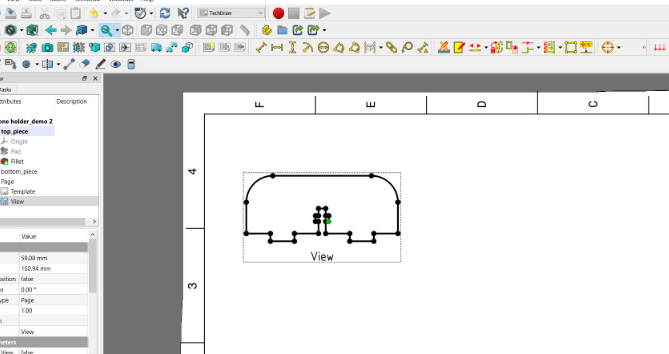
Підготовка конструкторських файлів для успішного лазерного різання
Ви вже вибрали матеріал і розумієте, яка технологія лазерного різання підходить для вашого проекту. Тепер настає етап, на якому багато новачків роблять помилки — підготовка файлів. Навіть найсучасніший лазерний чи ЧПУ-верстат для різання може працювати лише з тим, що ви йому надаєте, а погано підготовлені файли призводять до затримок, неточних розрізів і втрат матеріалів.
Уявіть собі файл вашого дизайну як набір інструкцій. Якщо ці інструкції містять помилки, неоднозначності або проблеми з форматуванням, верстат інтерпретує їх буквально — часто з досить неприємними наслідками. Але є й гарна новина: більшість проблем із підготовкою файлів повністю уникнені, як тільки ви зрозумієте, які саме вимоги до ваших дизайнів пред’являють послуги лазерного різання.
Формати файлів, які приймають усі лазерні майстерні
Лазерні різаки працюють із векторними файлами, а не растровими зображеннями. Чому? Векторні файли використовують математичні контури для визначення форм, що дозволяє масштабувати їх до будь-якого розміру без втрати якості. Растрове зображення (наприклад, JPEG або PNG) складається з пікселів, які стають розмитими при збільшенні й не забезпечують точних траєкторій різання, необхідних для машин.
Більшість точних лазерних різальних майстерень приймають такі стандартні формати:
- DXF (Drawing Exchange Format): Універсальний стандарт для CAD-файлів — практично всі майстерні приймають цей формат без проблем із конвертацією
- AI (Adobe Illustrator): Рідні файли Adobe Illustrator добре працюють, особливо для дизайну, що містить художні елементи
- SVG (Scalable Vector Graphics): Відкритий формат, який зберігає векторну цілісність у різних програмних платформах
- PDF (Portable Document Format): Приймається за умови наявності векторного зображення, хоча деякі майстерні надають перевагу спеціалізованим CAD-форматам
- DWG (Креслення AutoCAD): Рідний формат AutoCAD, який широко використовується в інженерних та архітектурних застосуваннях
Якщо виникають сумніви, DXF залишається найбезпечнішим варіантом. Згідно з Настановами SendCutSend , перевірка розмірів після перетворення з растрових форматів є обов’язковою — друк вашого макету в масштабі 100 % допомагає переконатися, що всі елементи мають правильні розміри до подання.
Помилки у макетуванні, які затримують ваш проект
Навіть досвідчені дизайнери при підготовці файлів роблять помилки. Зрозуміння найпоширеніших помилок допоможе уникнути багаторазових коригувань, що уповільнюють виробництво й збільшують витрати.
Ось помилки, які найчастіше призводять до проблем:
- Незав'язані шляхи: Кожна фігура повинна утворювати повний замкнений контур. Відкриті контури плутають системи лазерного різання — пристрій не може визначити, де закінчується внутрішня область і починається зовнішня. Як Зазначає Кірмелл , будь-який відкритий контур може призвести до неповного або неточного різання
- Накладення або дублювання ліній: Коли дві лінії розташовані в одному й тому самому положенні, лазер може прорізати цей шлях двічі, надмірно прожарюючи матеріал або створюючи більш широкий, ніж передбачено, різ
- Неправильний масштаб або одиниці вимірювання: Дизайн, що має розмір 10 мм у вашому програмному забезпеченні, може бути інтерпретований системою різання як 10 дюймів. Завжди перевіряйте, чи використовує ваш файл узгоджені одиниці вимірювання й чи відповідають вони заданим фізичним розмірам
- Відсутні допуски: Лазерне різання забезпечує надзвичайну точність — зазвичай ±0,1 мм — однак виготовлення без попереднього узгодження критичних розмірних вимог призводить до отримання деталей, які неправильно встановлюються в збірки
- Активні текстові поля: Текст, який не було перетворено на контури (або «розібрано» в деяких CAD-програмах), може відображатися неправильно або зовсім не різатися. Наведіть курсор на текстові елементи — якщо вони редагуються, їх потрібно перетворити на векторні фігури
- Вбудовані растрові зображення: Фонові зображення або не векторні графічні об’єкти, вбудовані в ваш файл, будуть або проігноровані, або спричинять помилки обробки
- Неможливо малі елементи: Деталі, розміри яких менші за ширину різального шва лазера, не можна точно вирізати. Кола, текст або складні візерунки, розміри яких нижчі за мінімальні порогові значення, призводять до обпалених або відсутніх елементів
Підготовка ваших файлів для успішного першого запуску
Правильна підготовка перетворює ваш дизайн на деталі, які вирізуються лазером і точно відповідають вашому задуму. Дотримуйтесь цих рекомендацій, щоб забезпечити можливість обробки ваших файлів послугами лазерного різання без необхідності внесення правок.
Переконайтеся, що всі контури замкнені: Скористайтеся інструментами аналізу контурів у вашій програмі для виявлення розривів. У Illustrator команда «Об’єднати» з’єднує відкриті кінцеві точки. Більшість CAD-програм мають аналогічні функції перевірки.
Видаліть усю дубльовану геометрію: Накладаючіся лінії часто виникають через операції копіювання та вставки або імпортування файлів з інших програм. Запустіть у вашій програмі функції очищення або об’єднання, щоб усунути надлишкові елементи.
Перетворіть текст на контури: Перед експортуванням виділіть усі текстові елементи й перетворіть їх на векторні контури. У Illustrator це означає використання команди «Створити контури». Користувачі SolidWorks можуть експортувати файли без занепокоєнь — більшість систем автоматично ігнорують водяні знаки «Student Version».
Враховуйте ширину різу: Лазерний промінь видаляє матеріал під час різання, зазвичай на 0,1–0,4 мм залежно від типу матеріалу та налаштувань потужності. Для досягнення точного прилягання змістіть лінії різання на половину очікуваної ширини різу. Багато майстерень надають конкретні значення ширини різу за запитом.
Перевірте наявність вирізаних елементів, що залишаються усередині контуру: Внутрішні деталі, які не з’єднані з основним кресленням, випадуть під час різання й не зможуть бути збережені. Якщо ці елементи вам потрібні, додайте невеликі містки («вушка»), щоб утримати їх на місці, або надішліть їх як окремі креслення.
Чітко вкажіть допуски: Для забезпечення високої точності лазерного різання критичних розмірів вкажіть у своєму файлі або примітках до замовлення конкретні вимоги щодо допусків. Стандартна точність становить приблизно ±0,1 мм, однак вказівка розмірів, які мають найбільше значення, допомагає операторам зосередити увагу на тих ділянках, де потрібна максимальна точність.
Перевірте розміри шляхом порівняння: Роздрукуйте своє креслення в масштабі 1:1 і виміряйте ключові елементи штангенциркулем або лінійкою. Цей простий крок дозволяє виявити помилки масштабування ще до того, як вони перетворяться на коштовні помилки.
Професійна порада: Багато послуг лазерного різання пропонують перевірку файлів до початку виробництва. Скористайтеся цим — швидка перевірка перед виробництвом допоможе виявити проблеми, які інакше могли б вимагати дорогих повторних запусків.
Маючи на руках правильно підготовлені файли, ви гарантовано отримаєте якісні результати. Але як лазерне різання співвідноситься з альтернативними технологіями? Розуміння сфер, у яких цей процес є найефективнішим, та тих, де інші методи можуть забезпечити кращі результати, допоможе вам зробити найрозумніший вибір для кожного проекту.
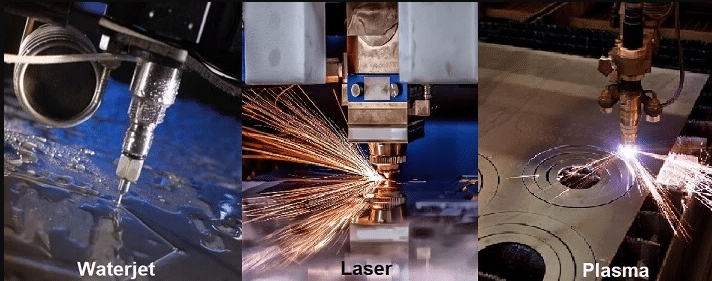
Лазерне різання проти водяного струменя, плазмового різання та фрезерування на ЧПУ
Ваші конструкторські файли готові, і ви знаєте, які матеріали найкраще підходять для лазерної обробки. Але варто задати собі таке питання: чи є лазерне різання справді оптимальним вибором для вашого конкретного проекту? Іноді відповідь — безумовне «так», а іноді альтернативні технології забезпечують кращі результати за нижчою вартістю.
Вибір неправильного методу різання може коштувати вам тисячі гривень через витрату матеріалу та втрачений час. Незалежно від того, чи керуєте ви металообробним цехом, чи замовляєте спеціальні деталі для проєкту, що вас захоплює, правильне співвідношення технології різання з вашими конкретними вимогами має вирішальне значення. Розглянемо, як CNC-лазерне різання порівнюється з трьома основними альтернативами: гідроабразивним, плазмовим та фрезеруванням на CNC.
| Технології | Рівень точності | Швидкість | Сумісність матеріалів | Якість країв | Фактори вартості | Найкращі випадки використання |
|---|---|---|---|---|---|---|
| Лазерне різання | ±0,001 мм до ±0,1 мм; чудово підходить для дрібних деталей | Швидке на тонких матеріалах; уповільнюється зі збільшенням товщини | Метали, пластики, дерево, тканини; обмежене використання на надто товстих або дзеркально відбиваючих матеріалах без волоконного лазера | Чисті, гладкі краї; мінімальна необхідність додаткової обробки | Помірна вартість обладнання; ефективне для серійного різання тонких листів | Складні конструкції, тонколистовий метал, прецизійні деталі, електроніка, інформаційні таблички |
| Водяна струя | зазвичай ±0,1 мм; чудово працює з товстими матеріалами | Повільніше, ніж лазерне та плазмове різання; у 3–4 рази повільніше при різанні сталі товщиною 1" порівняно з плазмовим | Майже будь-які матеріали, у тому числі камінь, скло, композити; до 24" товщини для грубого різання | Атласно-гладка поверхня; зони, впливу тепла відсутні | Вища вартість обладнання (~195 000 USD порівняно з 90 000 USD для плазмового) та вищі експлуатаційні витрати | Теплочутливі матеріали, товсті заготовки, камінь/скло, аерокосмічні компоненти |
| Плазма | Менш точне, ніж лазерне; підходить для конструкційних робіт | Найшвидший на товстих провідних металах | Лише провідні метали (сталь, алюміній, мідь) | Залишає шлак/шлакові включення; часто вимагає додаткової остаточної обробки | Найнижча вартість обладнання та експлуатаційні витрати | Конструкційна сталь, важка техніка, суднобудування, робота з товстими листами |
| Фрезерування CNC | ±0,01 мм; винятково підходить для складної тривимірної геометрії | Загалом повільніше; видаляє матеріал поступово | Метали, пластики, дерево, композити; добре справляється з товстими й щільними матеріалами | Гладка поверхня; може вимагати шліфування або полірування | Вищі початкові інвестиції; економічно вигідне для точних 3D-деталей | Складні 3D-деталі, авіаційна промисловість, медичні пристрої, обробка товстого матеріалу |
Коли лазерне різання перевершує альтернативи
Технологія лазерного CNC-обладнання найкраще проявляє себе, коли перетинаються точність і швидкість. Згідно з Дослідженням порівняльного аналізу компанії Makera , лазерне різання забезпечує допуски до ±0,001 мм — що робить його ідеальним для застосувань, які вимагають дрібної деталізації та гострих кромок. Наприклад: компоненти прикрас, корпуси електронних пристроїв, індивідуальні вивісок та складні декоративні роботи.
Зфокусований лазерний промінь створює надзвичайно чисті кромки, які часто не потребують додаткової обробки. Для тонких листових металів та детальних візерунків лазерне різання металів забезпечує результати, яких плазмове різання просто не може досягти. Якщо найвища якість кромок і точність є пріоритетними, то найкращим лазером для різання тонких матеріалів, як правило, є саме лазер.
Переваги швидкості стають особливо помітними при роботі з тонкими матеріалами та складними конструкціями. Тоді як фрезерування на ЧПК видаляє матеріал поступово (це тривалий процес для складних двовимірних візерунків), лазерне різання металу відбувається майже миттєво уздовж лінії різання. Високотемпова серійна продукція з жорсткими термінами виготовлення значно виграє завдяки цій ефективності.
Однак лазерне різання має й практичні обмеження. Промислове тестування підтверджує, що лазери погано справляються з поверхнями завтовшки понад один дюйм — а також що тепло, що виділяється під час різання, може залишати сліди опіків або теплових напружень, що вимагає додаткової остаточної обробки певних матеріалів.
Гідроабразивне різання проти лазерного різання для товстих матеріалів
Коли товщина матеріалу збільшується або виникають проблеми, пов’язані з його чутливістю до нагрівання, гідроабразивне різання стає привабливою альтернативою. Цей процес «холодного» різання використовує воду під високим тиском (часто з додаванням абразивних частинок), щоб розрізати матеріали без утворення зон, впливових на температурний режим.
Універсальність є вражаючою. Згідно з технічним порівнянням компанії Flow Waterjet, різання абразивним водяним струменем дозволяє обробляти практично будь-які матеріали — метали, камінь, скло, композити й навіть харчові продукти — з товщиною до 24 дюймів для грубого різання. Жодна інша технологія різання не забезпечує такої гнучкості щодо матеріалів.
Для застосувань, чутливих до тепла, вибір стає очевиднішим. Лазерне різання генерує концентровану теплову енергію, яка може спричинити деформацію тонких матеріалів або утворення загартованих зон у металах. Різання водяним струменем забезпечує шов з бархатисто-гладкою поверхнею без теплових спотворень, тому його віддають перевагу при виготовленні авіаційних компонентів, медичних пристроїв та матеріалів, у яких мають залишатися незмінними металургійні властивості.
Компроміс? Швидкість і вартість. Випробування показують, що різання плазмою сталі товщиною 1 дюйм приблизно в 3–4 рази швидше за гідрорізання, а експлуатаційні витрати становлять приблизно половину вартості на фут. Повні системи гідрорізання коштують близько 195 000 дол. США порівняно з 90 000 дол. США для порівнянних плазмових установок. Для більшості цехів металообробки, що спеціалізуються на сталі та алюмінії, плазмове або лазерне різання часто забезпечує кращий повернення інвестицій — однак гідрорізання залишається незамінним завдяки своїм унікальним можливостям.
Правильний вибір технології для вашого проекту
Після огляду цих технологій стає очевидним одне: не існує єдиного «найкращого» способу різання. Кожна з них переважає в певних сценаріях.
Обирайте лазерне та ЧПУ-лазерне різання, коли:
- Потрібні складні конструкції з дрібними деталями на тонких матеріалах
- Якість зрізу має значення, і ви хочете мінімальну кількість додаткової обробки
- Швидкість виробництва на листових матеріалах є пріоритетом
- Необхідні вузькі допуски (±0,1 мм або краще)
Обирайте гідроабразивне різання, коли:
- Матеріал не може витримувати теплове навантаження (аерокосмічні сплави, термооброблені метали)
- Ви ріжете неметалеві матеріали, такі як камінь, скло або композити
- Товщина перевищує один дюйм
- Зони, уражені нагріванням, неприйнятні для вашого застосування
Обирайте плазмову різку, коли:
- Товсті провідні метали (сталь, алюміній, мідь) переважають у вашій роботі
- Обмеження бюджету мають більше значення, ніж якість обробки кромок
- Швидкість різання товстих листів важливіша за вимоги до точності
- Шукайте плазмове різання поруч із вами зі швидким терміном виконання робіт з металоконструкцій
Обирайте фрезерування на CNC-верстаті, коли:
- Потрібні складні тривимірні форми
- Щільні або товсті матеріали потребують точної механічної обробки
- Якість поверхневої обробки вимагає додаткового полірування після різання
- У застосуваннях потрібно видаляти матеріал із суцільних заготовок, а не різати листовий матеріал
Багато успішних цехів з виготовлення виробів з металу з часом впроваджують кілька технологій — і на те є поважні причини. Починати з системи, яка найкраще відповідає вашим найпоширенішим проектам, — це раціонально, але поступове розширення можливостей дозволяє задовольняти ширші потреби клієнтів.
Розуміння того, яка технологія підходить для вашого проекту, — лише одна частина загадки. Однак не менш важливо знати, скільки коштують ці послуги й як формується ціноутворення — тема, що часто викликає роздратування в новачків, які прагнуть прозорості.
Розуміння вартості та чинників ціноутворення при лазерному різанні
Якщо ви колись шукали послугу лазерного різання поруч ізі мною та зазнали розчарування через нечітку інформацію про ціни, ви не самі. На відміну від купівлі товару з полиці, вартість лазерного різання суттєво варіюється залежно від десятків параметрів — і більшість постачальників спеціально не публікують фіксовані цінові списки.
Розуміння чинників, що визначають остаточну вартість, дає вам змогу приймати розумніші рішення, оптимізувати свої конструкції з метою економії коштів та ефективно спілкуватися під час запиту цитати на лазерне різання. Розглянемо детальніше фактори, які справді впливають на суму, яку ви заплатите.
Що визначає вашу остаточну вартість
Кожен проект лазерного різання є унікальним, але розрахунок вартості підкоряється передбачуваним закономірностям. Згідно з аналізом ціноутворення Komacut, основними чинниками є тип матеріалу, його товщина, складність конструкції, тривалість різання, витрати на робочу силу та процеси оздоблення. Ось як кожен із цих елементів впливає на вашу вартість лазерного різання:
- Тип матеріалу та його вартість: Різні матеріали мають різну базову вартість: нержавіюча сталь коштує дорожче, ніж вуглецева сталь, а спеціальні сплави мають преміальну ціну. Вартість сировини є основою будь-якої комерційної пропозиції
- Товщина матеріалу: Більш товсті матеріали вимагають більше енергії, меншої швидкості різання та призводять до збільшеного зносу обладнання. Деталь із сталі товщиною 1 мм може бути вирізана за 1–3 секунди, тоді як для більш товстих заготовок потрібно значно більше часу й енергії
- Складність дизайну: Складні візерунки з великою кількістю вирізів вимагають більшої кількості точок пробивання — кожна з яких додає час різання. Згідно з галузевими даними, збільшення кількості точок пробивання та довжини траєкторії різання безпосередньо підвищує вартість через триваліший час роботи обладнання
- Загальна довжина траєкторії різання: Лазер повинен пройти по всіх лініях вашого креслення. Більше різів означає більше часу, а час — це гроші, коли обладнання працює за тарифом $60–100+ на годину
- Додаткові вимоги до остаточної обробки: Видалення заусінець, полірування, шліфування, порошкове фарбування або збірка додають трудовитрати, час роботи обладнання та витрати матеріалів до загальної вартості
- Час виконання: Прискорені замовлення зазвичай передбачають надплату в розмірі 20–50 % за роботу в день замовлення або у вихідні дні. Стандартні строки виконання допомагають зберегти нижчу вартість.
Розумна порада щодо проектування: зменшення кількості вирізів та спрощення геометрії може значно знизити вартість без ушкодження функціональності.
Вартість прототипів порівняно з економією при серійному виробництві
Один із найпоширеніших запитів клієнтів: чому вартість одного прототипу на одиницю набагато вища, ніж при серійному виробництві? Відповідь полягає у тому, як витрати розподіляються в залежності від обсягу.
Кожне завдання лазерного різання передбачає фіксовані витрати на підготовку незалежно від кількості деталей — підготовка файлів, програмування верстата, завантаження матеріалу та перевірка якості виконуються як для одного, так і для тисячі виробів. При замовленні одного прототипу ви повністю покриваєте всі ці витрати на підготовку. При замовленні 100 деталей ті самі витрати на підготовку розподіляються між усіма одиницями.
Економіка працює таким чином:
- Прототипні партії (1–10 шт.): Вартість налаштування домінує у вашій ціні за одиницю. Очікуйте вищих тарифів на лазерне різання за штуку, але нижчих загальних інвестицій у проект для тестування концепцій
- Виробництво малих партій (10–100 штук): Вартість налаштування починає розподілятися значущим чином. Цей «солодкий» діапазон часто є доцільним для обмежених серій, спеціалізованих компонентів або тестування на ринку
- Обсяг виробництва (понад 100 штук): Постійні витрати стають незначними на одиницю. Ефективність використання матеріалів покращується завдяки оптимізованому розміщенню деталей, а виробничі майстерні можуть надавати знижки за обсягом як на машинний час, так і на матеріали
Ефективне розміщення — розташування деталей щільно одна біля одної на листах матеріалу — стає все більш вигідним при зростанні обсягів виробництва. Згідно з галузевими передовими практиками, сучасне програмне забезпечення для розміщення мінімізує відходи матеріалів, скорочує час різання й істотно знижує вартість на одиницю при серійному виробництві.
Багато послуг лазерного різання поруч із вами та в усьому секторі не вимагають мінімальних замовлень, що робить прототипування доступним. Однак розуміння структури вартості допомагає реалістично планувати бюджет на різні етапи проекту.
Отримання точних пропозицій швидко
Готові отримати точні цифри для свого проекту? Більшість майстерень пропонують системи миттєвого розрахунку вартості лазерного різання через свої веб-сайти, але точність автоматичних розрахунків значною мірою залежить від наданих вами даних. Ось як оптимізувати цей процес:
- Надсилайте чисті, правильно відформатовані файли: Файли DXF із замкненими контурами й правильними розмірами дозволяють системам автоматичного розрахунку точно обчислювати час різання. Помилки призводять до затримок через необхідність ручного перегляду.
- Вкажіть точні матеріали: "Сталь" — недостатньо: вкажіть марку (нержавіюча сталь 304, низьковуглецева сталь A36 тощо), товщину та будь-які спеціальні вимоги, наприклад, попередню обробку або сертифікацію.
- Чітко визначте кількості: Включіть потреби в прототипах та очікувані обсяги виробництва. Деякі майстерні надають градуйоване ціноутворення, що демонструє, як вартість знижується при досягненні різних порогових значень кількості.
- Зверніть увагу на всі вимоги щодо остаточної обробки: Додаткові операції, такі як зачистка кромок, гнуття, зварювання або нанесення покриття, впливають на загальну вартість. Зазначення цих операцій заздалегідь запобігає неочікуваним додатковим витратам у майбутньому
- Узгодьте очікуваний термін виконання: Стандартний термін виготовлення забезпечує нижчу вартість. Якщо вам потрібна прискорена доставка, повідомте про це заздалегідь, щоб постачальники могли надати відповідну цитату
Порівнюючи цитати від кількох постачальників, переконайтеся, що ви оцінюєте еквівалентні специфікації. Значно нижча ціна може свідчити про використання інших марок матеріалу, інших припущень щодо допусків або виключення певних етапів остаточної обробки. Задайте уточнюючі запитання до прийняття рішення — відкриті постачальники завжди раді такій бесіді
Розуміння основ ціноутворення дозволяє точно планувати бюджет і оптимізувати конструкції з метою підвищення їхньої вартісної ефективності. Однак вартість — лише один із критеріїв: знання того, у яких галузях застосовуються ці послуги та як саме вони використовують цю технологію, може надихнути вас на нові рішення у власних проектах.
Галузі та сфери застосування, що ґрунтуються на лазерному різанні
Тепер, коли ви розумієте динаміку ціноутворення, давайте розглянемо, де саме ця технологія застосовується на практиці. Від заводських цехів, що виробляють тисячі автомобільних компонентів, до гаражних майстерень, де створюються унікальні художні вироби, лазерне різання знаходить надзвичайно широке застосування. Аналіз того, як різні галузі використовують ці можливості, може надихнути вас на реалізацію власних проектів.
Універсальність промислового лазерного різання значно перевершує те, що уявляють більшість людей. Згідно з даними галузевих досліджень компанії Accurl, лазерні технології трансформували такі сектори, як авіакосмічне виробництво та ювелірне мистецтво — кожен із яких вимагає різного рівня точності, різних матеріалів та обсягів виробництва.
Автомобільна та транспортна сфера застосування
Коли йдеться про лазерне різання металів у дії, автомобільна промисловість є одним із найбільш вимогливих полів для їхнього застосування. Точність і стабільність тут не є варіантами — вони є обов’язковими вимогами, що безпосередньо впливають на безпеку та експлуатаційні характеристики транспортних засобів.
Сучасне виробництво транспортних засобів значною мірою покладається на лазерне різання листового металу для компонентів, які щоразу мають відповідати надто жорстким допускам.
- Компоненти шасі: Підсилювальні елементи рами, поперечні балки та конструкційні кронштейни, що вимагають стабільної точності розмірів у тисячах одиниць
- Панелі кузова: Зовнішні панелі дверей, елементи крил та внутрішні декоративні деталі, де якість зрізу впливає на точність прилягання та остаточне виконання
- Деталі системи вихлопу: Теплоізоляційні екрани, кріпильні кронштейни та елементи трубопроводів, виготовлені з нержавіючої сталі
- Елементи підвіски: Елементи важіля керма, кріплення пружин та кронштейни для регулювання кутів установки коліс, що вимагають жорстких допусків
- Деталі моторного відсіку: Кришки клапанів, впускні колектори та кронштейни для додаткового обладнання, виготовлені з алюмінієвих сплавів
Залізничний та транспортний сектор також отримує переваги від лазерного різання листового металу для компонентів поїздів, частин трамваїв та елементів інфраструктури. Згідно з Аналізом галузі компанії SENFENG високоміцна сталь та алюмінієві сплави, оброблені за допомогою волоконно-лазерних систем, забезпечують надійність і безпеку, яких вимагають ці застосування.
Від прототипів до серійного виробництва
Що робить лазерне різання особливо цінним у різних галузях промисловості — це його масштабованість: та сама технологія, що використовується для виготовлення одного прототипу, може бути розгорнута для виконання виробничих замовлень у кількості тисяч одиниць.
Аерокосмічна та оборонна промисловість: Немає багатьох галузей, де потрібна більша точність, ніж у авіакосмічній. Послуги лазерного різання труб використовуються для виготовлення конструктивних елементів, компонентів корпусів двигунів та літакових кронштейнів із титану, сталі з підвищеною межею міцності та спеціальних алюмінієвих сплавів. Здатність цієї технології зберігати міцність матеріалу під час різання є вирішальною, коли компоненти мають функціонувати в екстремальних умовах.
- Конструктивні кронштейни та підсилювальні елементи літаків
- Компоненти корпусів двигунів
- Частини супутників та космічних апаратів
- Броньові плити та компоненти бойових машин у військовій справі
Електроніка та корпуси: Тренд мініатюризації в електроніці вимагає різальних можливостей, що відповідають зменшенню розмірів компонентів. Лазерні системи створюють точні вирізи для вентиляції, отворів для кріплення та прокладання кабелів у серверних стійках, панелях керування та корпусах побутових пристроїв.
- Корпуси центрів обробки даних та компоненти серверних стійок
- Вирізи в панелях керування для перемикачів і дисплеїв
- Компоненти екранування ЕМІ
- Радіатори
Рекламні знаки та відображення: Рекламна індустрія використовує лазерне різання для створення вражаючих тривимірних знаків. Об’ємні літери, металеві логотипи, панелі світлових коробів і декоративні відображення вигідно використовують здатність цієї технології обробляти складні візерунки з чіткими краями. За словами спеціалістів галузі, волоконні лазери малої та середньої потужності (1000 Вт–3000 Вт) забезпечують необхідну точність для виготовлення складних шрифтів і деталізованих графічних зображень.
Архітектурні елементи: Сучасна архітектура все частіше включає індивідуальні металеві вироби — декоративні екрани, перила, панелі фасадів та внутрішні перегородки, які перетворюють функціональні елементи на дизайнерські рішення. Листовий нержавіючий сталь, мідь та алюміній перетворюються на складні візерунки, що визначають сучасні простори.
Творчі та художні проекти з лазерного різання
Ось де справа стає цікавою для окремих творців. Послуга лазерного різання для любителів відкриває можливості, які раніше були доступні лише промисловим виробникам — а сфери застосування обмежені лише уявою.
Згідно Документація проектів компанії Full Spectrum Laser , любителі та художники використовують лазерну технологію в неймовірно широкому спектрі творчих застосувань:
- Ювелірні вироби та аксесуари: Складні сережки, підвіски та декоративні вироби, вирізані з акрилу, дерева або тонких металів
- Декор дому: Індивідуальне настінне мистецтво, багаторівневі скульптури, персоналізовані подарунки та функціональні предмети, такі як підставки під чашки й підноси
- Виготовлення моделей: Архітектурні моделі, мініатюрні ландшафти для настільних ігор та масштабні копії з точним деталюванням
- Елементи меблів: Індивідуальні ручки для ящиків, декоративні вставки та конструктивні елементи для проєктів мейкерів
- Предмети для заходів та весіль: Таблички з іменами гостей, прикраси для торта, індивідуальні запрошення та пам’ятні вироби
Спільнота мейкерів особливо активно використовує лазерні системи з CO₂ для обробки дерева, акрилу та шкіри. Ці матеріали чисто ріжуться з мінімальними додатковими операціями після різання, що робить їх ідеальними для проєктів — від простих прототипів до готових виробів, придатних для продажу.
Що відрізняє професійні результати від любительських спроб, часто залежить від розуміння властивостей матеріалів та правильного підготовчого етапу створення файлів — знання, які ви вже отримали з попередніх розділів цього посібника.
Чи ви виробник, який шукає можливості для виробництва в промислових масштабах, чи хобіст, що досліджує творчі можливості, — однакова фундаментальна технологія задовольняє потреби обох кінців цього спектра. Ключова відмінність полягає у пошуку постачальника послуг, чиє обладнання, експертні знання та стандарти якості відповідають вашим конкретним вимогам — це тема, яку варто ретельно дослідити до розміщення будь-якого замовлення.
Як вибрати правильного постачальника послуг лазерної різки
Ви ознайомилися з лазерними технологіями, матеріалами, підготовкою файлів та чинниками вартості. Тепер настає рішення, яке об’єднує всі ці аспекти: вибір постачальника послуг, який зможе справді забезпечити результати, що відповідають вашим очікуванням. Цей вибір впливає на все — від якості деталей до термінів реалізації проекту: прийміть правильне рішення — і ваше виробництво пройде гладко; прийміть неправильне — і ви стикнетеся з затримками, необхідністю переділки виробів та роздратуванням.
Пошук послуг лазерного різання металу, які відповідають вашим конкретним потребам, вимагає більшого, ніж швидкий пошук у Інтернеті за запитом «лазерне різання поруч ізі мною». Процес оцінки вимагає ретельного аналізу технічних можливостей, систем забезпечення якості та практик комунікації. Розглянемо системний підхід до перевірки потенційних партнерів.
Оцінка технологічних можливостей та матеріальних здібностей
Не кожна майстерня лазерної обробки використовує однакове обладнання або обслуговує однакові ринки. Згідно з даними California Steel Services, першим кроком при виборі будь-якого постачальника є переконання в тому, що він справді може працювати з бажаним вами матеріалом — різні послуги спеціалізуються на різанні різноманітних матеріалів: від металів і пластмас до дерева й скла.
При оцінці послуг CNC-лазерного різання детально вивчіть специфікації їхнього обладнання:
- Тип і потужність лазера: Чи використовують вони CO₂-лазери, волоконні лазери чи обидва типи? Волоконні лазери з вищою потужністю (у діапазоні 6–12 кВт) здатні різати товстіші метали та відбивні матеріали, з якими не справляються системи з нижчою потужністю.
- Розмір робочого столу та його вантажопідйомність: Більші верстаки дозволяють розміщувати більші деталі та ефективніше їх компонувати під час виробничих партій. Деякі послуги точного лазерного різання працюють на верстаках довжиною понад 25 футів
- Специфікації точності: Якісні постачальники публікують свої допуски — шукайте можливості досягнення точності близько ±0,0005 дюйма для високоточних робіт
- Діапазон товщини матеріалу: Переконайтеся, що вони здатні обробляти саме вашу товщину листового матеріалу (калібр) або плити, а не лише тип матеріалу
Послуга лазерного різання сталі може добре справлятися з вуглецевою сталью, але не мати досвіду роботи з нержавіючою сталью чи алюмінієвими сплавами. Аналогічно, підприємство, що спеціалізується на лазерному різанні труб, має спеціалізовані знання й досвід у різанні круглих, квадратних і прямокутних труб, яких не мають установи, що працюють лише з плоскими верстаками. Зверніть особливу увагу на досвід роботи з вашим конкретним типом матеріалу — вибір постачальника з доведеною експертністю забезпечить кращі результати.
Чому сертифікації мають значення для забезпечення якості
Контроль якості відрізняє професійних постачальників послуг лазерного різання металу від майстерень, які просто мають лазерне обладнання. Згідно з керівництвом з оцінки компанії Wrightform, запити щодо процесів контролю якості розкривають, наскільки серйозно постачальник ставиться до точності розмірів, перевірки матеріалів та узгодженості деталей.
Для промислових застосувань — зокрема в автомобільній, авіаційній та медичній галузях — сертифікації надають об’єктивне підтвердження систем якості:
- IATF 16949: Стандарт автомобільної галузі, що демонструє комплексні системи управління якістю. Виробники, такі як Shaoyi (Ningbo) Metal Technology підтримують цю сертифікацію спеціально тому, що клієнти з автомобільної галузі, які замовляють шасі, підвіски та конструктивні компоненти, вимагають підтверджених процесів забезпечення якості
- ISO 9001: Базова сертифікація систем управління якістю, що свідчить про наявність задокументованих процедур та практик безперервного покращення
- AS9100: Сертифікація, спеціально призначена для авіаційної галузі й обов’язкова для постачальників компонентів для оборонної та авіаційної промисловості
- ISO 13485: Сертифікація виробництва медичних виробів із суворими вимогами щодо прослідковуваності
Чому сертифікації мають практичне значення? Вони свідчать про те, що постачальник дотримується задокументованих процедур інспекції, підтримує каліброване обладнання та може продемонструвати відстежуваність на всіх етапах виробництва. У випадку критичних застосувань співпраця з сертифікованими виробниками усуває невизначеність щодо того, чи будуть деталі послідовно відповідати технічним вимогам.
Крім сертифікацій, уточніть конкретні заходи контролю якості: чи проводяться ними розмірні інспекції? Яке вимірювальне обладнання вони використовують? Як вони забезпечують перевірку матеріалів? Прозорі постачальники вітають такі запитання — уникливі відповіді можуть свідчити про потенційні прогалини в системі якості.
Питання, які слід задати перед розміщенням замовлення
Перш ніж укладати угоду з будь-яким постачальником, зберіть усю необхідну інформацію для прийняття обґрунтованого рішення. Скористайтеся цим поетапним контрольним списком оцінки, щоб системно оцінити потенційних партнерів:
- Підтвердьте сумісність матеріалів та наявний досвід: "Які матеріали ви обробляєте регулярно та які товщини можете обробляти для [вашого конкретного матеріалу]?" Шукайте постачальників із доведеним досвідом роботи з вашим типом матеріалу — а не лише теоретичними можливостями
- Перевірте технічні специфікації: "Які типи лазерів ви використовуєте та на яких рівнях потужності?" Для обробки металів волоконні лазери потужністю 6 кВт і вище свідчать про серйозні можливості. Деякі постачальники, наприклад California Steel Services, використовують волоконні лазери потужністю від 6 до 12 кВт з точністю ±0,0005 дюйма
- Дізнайтесь про терміни виконання замовлень: "Який у вас стандартний термін виконання замовлення та чи надаєте ви прискорені варіанти?" Виробнича потужність значно варіюється — деякі майстерні виконують термінові замовлення протягом декількох днів, тоді як інші потребують тижнів
- Ознайомтеся з сертифікатами якості: "Які сертифікації ви підтримуєте, і чи можете надати документацію?" Для автомобільних застосувань сертифікація IATF 16949 — як у компанії Shaoyi для їхніх послуг швидкого прототипування та автоматизованого виробництва — свідчить про інфраструктуру якості, необхідну для серйозних проектів
- Оцініть доступність дизайнерської підтримки: "Чи надаєте ви огляд файлів або допомогу у вдосконаленні конструкції?" Згідно з галузевими передовими практиками, компанії, що надають дизайн-підтримку, можуть сприяти удосконаленню проектів та уникненню коштовних помилок
- Уточніть додаткові можливості послуг: "Чи надаєте ви вторинні операції, такі як зачистка кромок, гнуття, оздоблення або збирання?" Постачальники «під ключ» спрощують логістику та забезпечують узгодженість на всіх етапах виробництва
- Оцінка оперативності комунікації: "Який зазвичай термін виконання комерційної пропозиції?" Постачальники, що надають швидкі відповіді — деякі надсилають комерційні пропозиції впродовж 12 годин — демонструють орієнтацію на клієнта, яка, як правило, зберігається протягом усього проекту
- Перевірте масштабованість: "Чи можете ви обробляти як прототипні партії, так і серійні обсяги?" Гнучкі постачальники можуть адаптуватися до зростання без потреби шукати нових партнерів у міру зміни ваших потреб
- Врахуйте географічні аспекти: "Де ви розташовані та які варіанти доставки ви пропонуєте?" Близьке розташування скорочує витрати на доставку та час перевезення, хоча багато послуг точного лазерного різання ефективно обслуговують всю країну
- Запитайте рекомендації або зразки: "Чи можете ви надати приклади схожих робіт або рекомендації клієнтів?" Професійні постачальники впевнено демонструють свій досвід — схильність уникати цього може свідчити про обмежений релевантний досвід
Професійна порада: найкращим показником майбутньої ефективності є минула поведінка. Запитайте рекомендації в клієнтів із схожими вимогами до проектів та зв’яжіться з ними для уточнення перед розміщенням значних замовлень.
Якість комунікації під час процесу надання комерційної пропозиції часто передбачає весь подальший робочий взаємозв’язок. Постачальники, які оперативно відповідають, детально відповідають на запитання та проактивно виявляють потенційні проблеми, демонструють уважність, що забезпечує дотримання графіку реалізації проектів. Навпаки, повільні відповіді та нечіткі пояснення на етапі продажів рідко покращуються після початку виробництва.
Для високотоннажних автомобільних або промислових застосувань, де потрібна стабільна якість на тисячах деталей, критерії оцінки стають ще суворішими. Комплексна підтримка DFM (проектування з урахуванням технологічності виготовлення), можливості швидкого прототипування та сертифіковані системи управління якістю відрізняють кваліфікованих партнерів від базових послуг різання. Виробники, які пропонують швидке прототипування протягом 5 днів разом із автоматизованим масовим виробництвом — із сертифікатом IATF 16949, що підтверджує їхні заяви щодо якості, — забезпечують ту надійність, яка потрібна для таких вимогливих застосувань.
Витрачаючи час на ретельну оцінку потенційних партнерів до розміщення замовлень, ви запобігаєте витратному циклу невідповідних деталей, затримок у строках виконання та зміни постачальників. Наведений вище контрольний перелік надає загальну структуру — адаптуйте її під свої конкретні вимоги й не соромтеся задавати додаткові запитання, доки не переконаєтеся у правильності свого вибору.
Поширені запитання про майстерні лазерного різання
1. З якими матеріалами працюють майстерні лазерного різання?
Професійні майстерні лазерного різання обробляють широкий спектр матеріалів, зокрема метали (сталь, нержавіюча сталь, алюміній, мідь, латунь), пластики (акрил, ПОМ/Делрін), дерево (тверді та м’які породи, фанера, ДСП), тканини, папір і картон. Волоконні лазери чудово підходять для різання металів, тоді як CO₂-лазери найефективніші для органічних матеріалів, таких як дерево й акрил. Проте певні матеріали, наприклад ПВХ та АБС, слід уникати через виділення токсичних парів.
2. Скільки коштує лазерна різка?
Вартість лазерного різання залежить від кількох факторів: типу та товщини матеріалу, складності конструкції (кількості вирізів і довжини траєкторії різання), замовленої кількості, терміну виконання замовлення та вимог до остаточної обробки. Вартість прототипних партій на один виріб вища через фіксовані витрати на підготовку, тоді як серійне виробництво понад 100 штук значно знижує вартість одного виробу. Більшість майстерень надають миттєві онлайн-розрахунки вартості після завантаження правильно оформлених файлів конструкторської документації.
3. У чому різниця між CO2 та волоконним лазерним різанням?
CO₂-лазери використовують суміш газу вуглекислого газу, що генерує хвилю довжиною 10,6 мікрометра, і тому є ідеальними для різання неметалів, таких як дерево, акрил, скло та текстильні матеріали. Волоконні лазери генерують хвилю довжиною 1,064 мікрометра з інтенсивністю, що в 100 разів перевищує інтенсивність CO₂-лазерів, і чудово справляються з різанням металів, у тому числі відбивних матеріалів, таких як алюміній і мідь. Крім того, волоконні лазери потребують меншого технічного обслуговування, а їхній термін служби перевищує 25 000 годин.
4. Які формати файлів приймають майстерні лазерного різання?
Більшість майстерень лазерного різання приймають векторні формати файлів, зокрема DXF (універсальний стандарт), AI (Adobe Illustrator), SVG, PDF (з векторними зображеннями) та DWG (AutoCAD). Растрові зображення, такі як JPEG або PNG, не можна використовувати безпосередньо. Ваші файли з дизайнами повинні мати замкнені контури, відсутність накладаючих ліній, правильний масштаб і одиниці виміру, а текст має бути перетворений у контури для успішної обробки.
5. Як обрати правильного постачальника послуг лазерного різання?
Оцінюйте постачальників за їхніми лазерними технологіями та рівнями потужності, експертністю у роботі з певними матеріалами, сертифікатами якості (IATF 16949 — для автомобільної промисловості, ISO 9001 — для загальних вимог щодо якості), термінами виконання замовлень та оперативністю у комунікації. З’ясуйте, чи мають вони досвід роботи з вашим типом матеріалу, запитайте про специфікації допусків і дізнайтесь про додаткові послуги, наприклад, зачистку кромок або остаточну обробку. Виробники, сертифіковані за IATF 16949, такі як Shaoyi, надають комплексну підтримку на етапі проектування з урахуванням вимог виробництва (DFM) та швидке прототипування для складних завдань.